

Bigger, Better Meetings with Multiple Neat Centers—Powered by Android 13
Mario Follestad, Jan 27, 2026
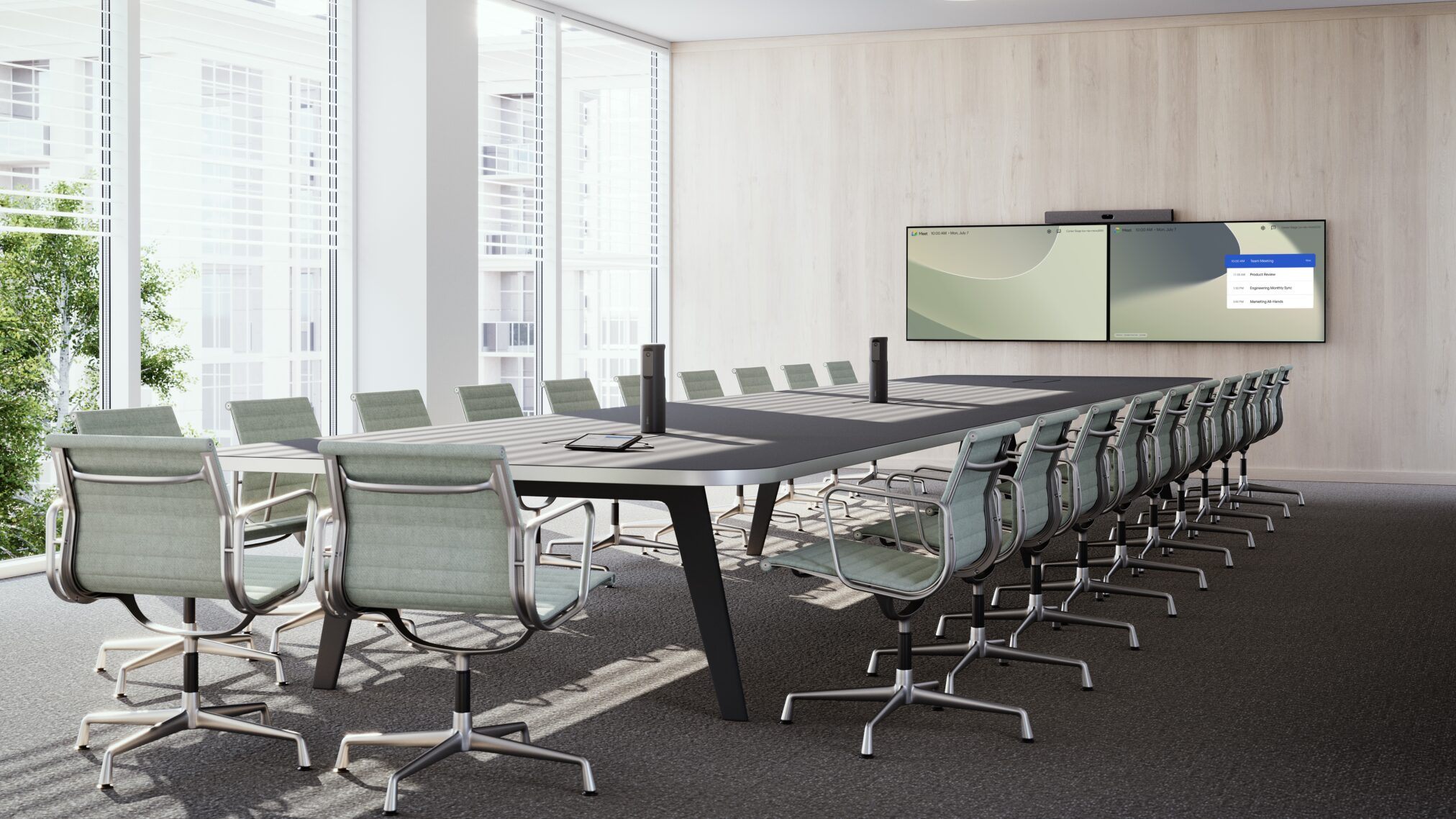
New 3x Neat Center support, smarter AI framing, and Android 13 come together to deliver more natural, inclusive meetings in large and complex spaces.
Great meetings shouldn’t depend on where you sit. Or how big the room is.
With our latest Neat upgrades, we’re making large and complex meeting spaces feel just as natural, inclusive, and engaging as smaller rooms for everyone, everywhere. The headline feature? Support for multiple Neat Centers, working together seamlessly to extend audio and video coverage like never before.
One Neat Center is great. Now you can have two—or even three.
We’re introducing multiple Neat Center support, designed to scale your Neat experience to larger rooms without sacrificing clarity or equity.
With two Neat Centers, paired to your front-of-room Neat device, everyone in the room is seen and heard clearly—whether they’re seated at the table, standing, or moving around. And for even bigger or more complex spaces, you can now test adding a third Neat Center (beta) to push coverage even further.
What this unlocks:
- True meeting equity in large rooms
Enhanced camera coverage and audio pickup ensure participants at the back of the room are just as present as those up front. Three Neat Centers (beta) make this possible even in large rooms with extended seating layouts. - Dynamic framing that feels natural
Our intelligent, machine-learning technology frames each person once, from the best possible angle—no duplication, no awkward cuts, even with multiple cameras active. - Smarter speaker tracking
Whether one person is talking, several people jump in, or someone moves across the room, Neat intelligently keeps the active speaker face-on for remote participants. - A built-in “camera crew”
The system automatically selects the optimal view across cameras, creating smooth transitions and a production-quality experience that pulls remote attendees into the conversation. - Seamless integration with Neat Focus
Combine multiple Neat Centers with Neat Focus to show everyone around the table and spotlight presenters or key collaboration zones—even dedicating one Neat Center to presenters and others to participants.
Why we built this
Meeting rooms are getting bigger. Setups are getting more complex. And expectations for meeting equity are higher than ever.
You told us you loved the clarity Neat Center brings—but needed that same experience to scale. Multiple Neat Center support answers that need, extending coverage across larger spaces without adding complexity. The option to test a third Neat Center (beta) gives teams even more flexibility and future-proofing for their largest rooms.
How it works
- Pair two Neat Centers with your front-of-room device for synchronized coverage
- Optionally add a third Neat Center (beta) for larger layouts with longer tables or to focus solely on the presenter in the room.
- AI dynamically selects the best camera angle for each participant—seated, standing, or presenting
- Speaker Framing follows the active speaker smoothly across devices
- Neat Focus zones tailor views to presenters, participants, or collaboration areas
Note: Multiple Neat Center (two or three; beta) is supported on Neat Generation 2 devices only: Neat Bar Gen 2, Neat Bar Pro, Neat Board 50, and Neat Board Pro.
Neat Focus gets smarter and more flexible
Neat Focus has evolved. Since our previous 25.3 software update, it’s become more powerful, more flexible, and better suited for larger, more dynamic rooms—especially those using one or more Neat Centers.
What’s new in Neat Focus
Support for multiple Neat Centers
Neat Focus now works with two Neat Centers (or three; beta) alongside your primary Neat device. Pair them via Neat Pad and assign each to different zones—for example, one for presenters and another for participants around the table.
New framing modes
You can now choose how each Neat Center appears on screen:
- Mixing (main frame) – Dynamically switches between one or both views based on activity
- Static (additional frame) – Always shows the selected view
- Adaptive (additional frame) – Shows the view only when someone enters the zone
Each Neat Center can be configured independently, giving you full control over how your room is presented.
Easy configuration
All Neat Focus settings live directly on Neat Pad, where you can pair devices, define zones, and choose framing modes in just a few taps.
Even more natural meetings with Dynamic Framing
We’re also introducing Dynamic Framing, a new AI-powered feature unique to Neat that ensures everyone is framed clearly, wherever they sit or move.
By intelligently coordinating your primary Neat device with paired Neat Centers, Dynamic Framing automatically selects the best camera angle for each person and transitions smoothly between views. The result is a fluid, human experience that feels like a professional camera crew is in the room.
Note: Dynamic Framing is supported on Neat Generation 2 devices only.
Android 13 on Neat devices: what you need to know
You can now run these Neat devices on Android 13:
These devices remain on Android 10 for now:
- Neat Bar (BYOD)
- Neat Board
- Neat Frame (Android 13 coming later)
Why Android 13 matters
- A strong investment in Neat’s future platform
- Improved performance and security with Android 13
- Future-ready devices for upcoming features
Important: Neat is certified to run A13 on Microsoft Teams, with Zoom certification in progress. Any support requests should go through Neat.
Bigger Rooms. Better Meetings. Same Neat Experience
With multiple Neat Center support, enhanced Neat Focus, and Dynamic Framing, we’re redefining what’s possible in large meeting spaces—without adding complexity.
No matter how big the room becomes, everyone gets a seat at the table.
How Neat is that?!
These latest software upgrades are currently in preview and will roll out to our customers in February. Explore the full list of our latest 25.4.2 upgrades on Neat Preview Channel Firmware.
You can also check out the Neat Center Integration Design Guide for setup inspiration and best practices.
Questions? Talk to a Neat product specialist, join one of our live product tours, or book a one-on-one demo for a personalized deep dive.