


What Are AI Auto-Framing Cameras? How They Work and Why They Matter in 2026
Hayley Spooner, Jul 21, 2026

Key takeaways
- AI auto-framing cameras automatically adjust the camera view to keep meeting participants visible without manual intervention.
- Intelligent framing improves meeting equity by helping remote participants see everyone clearly.
- Modern AI cameras combine computer vision, audio intelligence, and machine learning to create more natural collaboration experiences.
- Auto-framing reduces meeting interruptions and simplifies the user experience.
- Businesses should evaluate meeting room cameras based on the overall collaboration experience—not just image resolution.
- AI-powered cameras are becoming a standard feature of modern hybrid meeting spaces.
Introduction
Video conferencing has evolved dramatically over the past few years. While high-definition video was once considered a premium feature, today’s organisations expect meeting technology to do far more than simply capture a room.
Modern collaboration cameras now use artificial intelligence to actively improve the meeting experience. Rather than remaining fixed in one position, they can recognise participants, adjust framing automatically, and optimise what remote attendees see throughout the conversation.
This technology—known as AI auto-framing—has become one of the most valuable features in hybrid meeting rooms. By ensuring everyone stays visible without manual camera adjustments, it helps create more inclusive, engaging, and productive meetings.
As organisations continue investing in AI-ready workplaces, intelligent camera technology is becoming just as important as high-quality audio, reliable connectivity, and intuitive meeting room design.
This guide explains how AI auto-framing works, why it matters, and what organisations should consider when choosing intelligent meeting room cameras in 2026.
What is AI auto-framing?
AI auto-framing uses computer vision and artificial intelligence to automatically adjust a camera’s field of view so everyone in a meeting remains clearly visible.
Unlike traditional webcams that capture a fixed image, AI-powered cameras continuously analyse the meeting space and adjust framing based on where participants are positioned.
If someone joins the meeting, leaves the room, or moves during a presentation, the camera automatically updates the composition without requiring anyone to manually reposition it.
This creates a more natural viewing experience for remote participants while reducing interruptions during meetings.
AI auto-framing is commonly used in:
- Conference rooms
- Huddle spaces
- Boardrooms
- Training rooms
- Classrooms
- Hybrid collaboration spaces
Auto-framing vs speaker tracking
Although they’re often mentioned together, auto-framing and speaker tracking are different technologies.
Auto-framing focuses on the group by ensuring everyone remains comfortably within the camera’s view.
Speaker tracking focuses on the individual who is actively speaking, dynamically following them as the conversation moves around the room.
Many modern meeting room systems combine both capabilities to create a more engaging experience for remote participants.
| Feature | AI auto-framing | Speaker tracking |
| Focus | Entire group | Active speaker |
| Camera movement | Adjusts to include everyone | Follows the current speaker |
| Best for | Team meetings | Presentations and discussions |
| Primary goal | Meeting equity | Speaker engagement |
How AI auto-framing works
AI auto-framing combines computer vision, machine learning, and intelligent image processing to create a better meeting experience automatically.
Although every manufacturer uses slightly different technology, the overall process follows the same principles.
Participant detection
The camera continuously scans the meeting space using computer vision algorithms to identify where people are located.
Rather than simply detecting movement, modern AI systems recognise human shapes and distinguish participants from furniture, displays, or other objects.
Intelligent composition
Once participants have been identified, the camera determines the best framing for the meeting.
Instead of zooming aggressively or making constant adjustments, intelligent systems aim to create a balanced composition that feels natural for remote viewers.
The goal is to show everyone clearly while maintaining appropriate spacing around the group.
Dynamic adjustments
Meetings are rarely static.
People arrive late, move around the room, stand to present, or gather around whiteboards.
AI auto-framing continuously adapts to these changes, updating the camera view only when necessary to minimise distractions while keeping participants comfortably in frame.
AI working alongside audio
Modern collaboration devices don’t rely on video alone.
Many combine intelligent cameras with advanced microphone arrays and audio processing to better understand what’s happening in the room.
This allows the system to make smarter framing decisions while creating a more natural experience for remote participants.
Benefits of AI auto-framing
The greatest advantage of AI auto-framing isn’t simply keeping people in view—it’s making meetings feel more natural for everyone involved.
Better meeting equity
Hybrid meetings often struggle because remote participants feel disconnected from conversations taking place in the room.
Fixed cameras can leave people appearing small, poorly positioned, or even partially out of frame.
AI auto-framing helps address this by ensuring everyone remains visible throughout the meeting.
Whether there are two people in a huddle room or ten participants around a conference table, the camera automatically adjusts to create a balanced view that gives remote attendees a better sense of being part of the discussion. This is called meeting equity.
More natural collaboration
Meetings should adapt to people—not the other way around.
Without intelligent framing, participants often find themselves stopping meetings to reposition cameras or asking questions like:
- “Can everyone see me?”
- “Am I in frame?”
- “Can someone move the camera?”
AI auto-framing removes much of this friction by adjusting automatically as people enter, leave, or move around the room.
Employees can focus on collaborating instead of managing technology.
Fewer meeting interruptions
Every manual adjustment interrupts the flow of a meeting.
By automatically maintaining the best camera composition, AI-powered systems reduce unnecessary pauses and technical distractions.
This is particularly valuable during:
- Customer presentations
- Executive meetings
- Workshops
- Training sessions
- Brainstorming sessions
The result is a smoother experience that allows conversations to remain focused on the meeting rather than the equipment.
Improved engagement for remote participants
People contribute more effectively when they can clearly see what’s happening in the room.
Remote attendees rely entirely on the meeting camera to understand body language, group dynamics, and non-verbal communication.
By intelligently framing participants, AI cameras help create stronger visual connections between in-room and remote employees.
This contributes to more inclusive discussions, improved participation, and better meeting outcomes.
Smarter hybrid meeting rooms
AI auto-framing is only one part of today’s intelligent collaboration environments.
Many organisations are combining AI-powered cameras with:
- Intelligent microphone arrays
- Noise suppression
- Voice enhancement
- Automatic speaker tracking
- AI meeting assistants
- Live transcription
- Meeting summaries
Together, these technologies help create meeting rooms that require less manual setup while delivering consistently high-quality collaboration experiences.
Easier IT management
From an IT perspective, intelligent meeting room cameras also reduce operational complexity.
Instead of relying on users to configure cameras correctly before every meeting, AI handles framing automatically.
This creates a more consistent experience across multiple meeting rooms while reducing support requests and helping standardise collaboration technology throughout the organisation.
AI auto-framing vs standard webcams
Choosing a meeting room camera is about far more than image quality alone.
| Feature | Standard webcam | AI auto-framing camera |
| Camera framing | Fixed | Automatically adjusts to participants |
| Multiple participants | Limited coverage | Optimised group framing |
| Presenter movement | May move out of frame | Continuously adapts |
| Meeting setup | Manual positioning | Automatic |
| Meeting equity | Limited | Improved visibility for remote participants |
| Collaboration experience | Basic video | Intelligent, AI-assisted meetings |
While consumer webcams remain suitable for individual users, organisations designing hybrid meeting spaces increasingly benefit from dedicated AI-powered collaboration cameras that adapt automatically to changing meeting dynamics.
Is AI auto-framing worth it?
For organisations that regularly rely on video conferencing, AI auto-framing has become one of the most valuable investments they can make in meeting room technology.
The technology delivers benefits that extend well beyond improved video quality.
AI auto-framing helps organisations:
- Create more inclusive hybrid meetings
- Reduce meeting friction
- Improve visibility for remote participants
- Simplify meeting room operation
- Reduce manual camera adjustments
- Support AI-ready collaboration environments
As hybrid work becomes a permanent part of modern business, employees increasingly expect meeting technology to work seamlessly in the background.
Intelligent cameras that automatically adapt to people—not the other way around—are helping organisations meet those expectations while creating collaboration experiences that feel more natural, engaging, and productive.
Trends shaping intelligent meeting cameras in 2026
AI is transforming meeting cameras from simple video devices into intelligent collaboration systems.
Modern meeting room cameras no longer just capture video—they actively optimise the meeting experience. As organisations continue investing in hybrid work, intelligent camera technology is becoming a core part of AI-ready workplaces.
Several trends are shaping the future of meeting room cameras.
AI-powered meeting equity
Meeting equity has become a key priority for organisations supporting hybrid work.
Rather than focusing solely on the people in the room, intelligent cameras are designed to create a balanced experience for everyone—whether they’re attending in person or remotely.
This means:
- Better participant visibility
- More natural framing
- Improved eye contact
- Fairer participation during discussions
As organisations continue refining their hybrid work strategies, meeting equity is becoming an important measure of meeting quality.
Cameras and audio working together
The best meeting experiences come from intelligent systems—not individual devices.
Modern collaboration platforms increasingly combine:
- AI auto-framing
- Speaker tracking
- Beamforming microphones
- Noise suppression
- Voice enhancement
- Intelligent audio processing
Rather than treating cameras and microphones as separate technologies, organisations are adopting integrated collaboration systems that optimise the entire meeting experience automatically.
AI-assisted collaboration
Artificial intelligence is expanding well beyond the camera.
Today’s collaboration platforms increasingly include:
- Live transcription
- Automatic meeting summaries
- Action item generation
- Speaker identification
- Intelligent search
- AI assistants
High-quality audio and video provide the foundation for these AI capabilities. Cameras that consistently capture participants clearly help improve the accuracy of transcription, speaker recognition, and other AI-powered meeting features.
Flexible collaboration spaces
Hybrid work has made flexibility increasingly important.
Meeting rooms are no longer expected to support just one collaboration platform or one style of working.
Instead, organisations are creating spaces that can adapt to:
- Formal board meetings
- Customer presentations
- Brainstorming sessions
- Hybrid workshops
- Remote training
- Cross-platform collaboration
Intelligent meeting cameras play an important role by automatically adapting as room layouts and meeting styles change.
Simplicity by design
As organisations deploy more collaboration technology across multiple offices, reducing complexity has become just as important as adding new features.
Integrated devices that combine cameras, microphones, speakers, and AI into a single solution simplify deployment, reduce support requirements, and create a more consistent experience for employees.
Common mistakes to avoid
Choosing a meeting room camera involves much more than comparing technical specifications.
Some of the most common mistakes include:
Choosing cameras based only on resolution
A 4K camera doesn’t automatically deliver a better meeting experience.
Features such as intelligent framing, audio quality, microphone coverage, and software integration often have a much greater impact than image resolution alone.
Confusing auto-framing with speaker tracking
Although the technologies work well together, they solve different problems.
Auto-framing keeps everyone visible, while speaker tracking follows whoever is talking.
Understanding the distinction helps organisations choose solutions that best match their meeting spaces.
Using consumer webcams in meeting rooms
Consumer webcams are designed for individual users sitting close to a computer.
Meeting rooms require technology capable of capturing multiple participants across larger spaces while delivering professional-quality audio and video.
Purpose-built collaboration devices are generally better suited to these environments.
Ignoring audio quality
People will often tolerate imperfect video—but poor audio quickly makes meetings frustrating.
When evaluating meeting room technology, organisations should consider microphones, speakers, echo cancellation, and voice enhancement alongside camera performance.
The overall collaboration experience depends on both seeing and hearing participants clearly.
Forgetting future flexibility
Workplace technology continues to evolve rapidly.
Choosing meeting room solutions that support multiple collaboration platforms and ongoing software updates helps organisations protect their investment as new AI capabilities and workplace requirements emerge.
Where Neat fits in
Great meetings aren’t created by cameras alone—they’re created by intelligent collaboration experiences.
AI auto-framing is one important part of delivering engaging hybrid meetings, but it works best when combined with exceptional audio, intuitive design, and technology that removes friction for users.
That’s the philosophy behind Neat.
Rather than treating cameras, microphones, speakers, and software as separate components, Neat designs integrated collaboration devices that work together to create more natural meeting experiences.
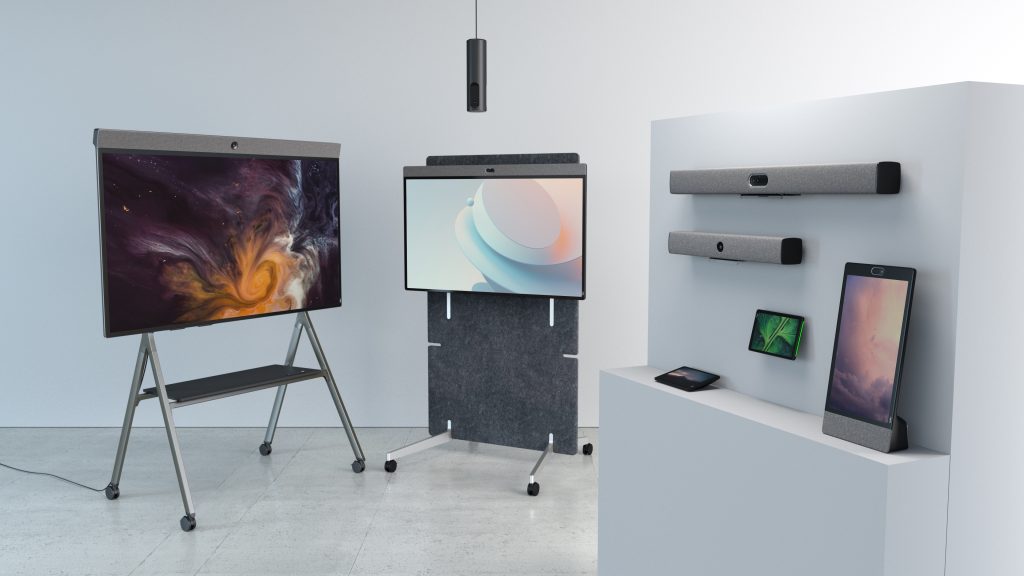
For meeting rooms of all sizes, Neat Bar Generation 2 combines a high-resolution camera, adaptive microphone array, premium speakers, and intelligent processing into a single device. Features such as Neat Symmetry dynamically frame participants to give remote attendees a clearer, more balanced view of everyone in the room, helping create greater meeting equity without requiring manual camera adjustments.
For interactive collaboration, Neat Board 50 combines video conferencing, wireless content sharing, digital whiteboarding, a multi-touch display, and an intelligent camera into one integrated device. Whether teams are brainstorming, presenting ideas, or collaborating across locations, the technology adapts automatically to support a more engaging meeting experience.
In larger spaces, Neat Center extends visibility beyond the front-of-room camera by bringing remote participants closer to in-room conversations. Working alongside other Neat devices, it helps ensure people remain seen and heard wherever they’re sitting.
As organisations increasingly support multiple collaboration platforms, Neat Open provides the flexibility to choose the applications and meeting experiences that best fit their business without being locked into a single ecosystem.
Supporting every device are Neat Experiences—a collection of proprietary technologies that intelligently optimise framing, audio, video, and meeting equity in real time. Instead of asking users to adjust technology during every meeting, these experiences work quietly in the background so people can focus on collaborating.
By combining AI-powered cameras with intelligent audio and seamless user experiences, Neat helps organisations build meeting spaces that are ready for the future of hybrid work.
Perhaps it’s time to book a demo and experience them for yourself.
Frequently asked questions
What is AI auto-framing?
AI auto-framing uses computer vision and artificial intelligence to automatically adjust a meeting camera so everyone remains comfortably visible throughout a video call, without requiring manual camera adjustments.
Is auto-framing the same as speaker tracking?
No. Auto-framing keeps the entire group in view, while speaker tracking follows the person who is actively speaking. Many modern meeting room systems combine both technologies to create a more engaging experience.
Does AI auto-framing work with multiple people?
Yes. AI auto-framing is specifically designed to detect multiple participants and adjust the camera view as people enter, leave, or move around the room.
Do I need an AI camera for Zoom or Microsoft Teams?
If your organisation regularly uses hybrid meeting rooms, an AI-powered meeting camera can significantly improve visibility, meeting equity, and the overall collaboration experience regardless of whether you’re using Zoom, Microsoft Teams, or another supported platform.
Does AI auto-framing improve hybrid meetings?
Yes. By automatically keeping participants in frame, AI auto-framing helps remote attendees feel more connected to in-room conversations, creating a more inclusive meeting experience.
Can AI auto-framing be used in large meeting rooms?
Yes. Many enterprise collaboration systems use advanced AI, multiple cameras, or companion devices to extend coverage across larger meeting spaces while maintaining intelligent participant framing.
What’s the difference between a webcam and a meeting room camera?
Consumer webcams are designed for individual users, while meeting room cameras are built for shared spaces. They typically include wider fields of view, advanced microphones, intelligent framing, and centralised management features designed for professional collaboration.
Sources
- Work Trend Index Annual Report, Microsoft, https://www.microsoft.com/worklab/work-trend-index
- Global Workplace Survey, Gensler Research Institute, https://www.gensler.com/gri
- 15 Video Camera Technology Trends for Remote Teams in 2026, Neat Resources, https://neat.no/resources/15-video-camera-technology-trends-for-remote-teams-in-2026/
- The Leesman Index, Leesman, https://www.leesmanindex.com





