


Video Bars for Conference Rooms: Benefits, Use Cases, and What to Look for in 2026
Hayley Spooner, Jun 24, 2026
Key takeaways
- Video bars combine cameras, microphones, and speakers into a single device, simplifying conference room deployments.
- Modern video bars help create more equitable meeting experiences for hybrid teams.
- Organizations are increasingly adopting video bars to reduce meeting friction and technology complexity.
- AI-powered capabilities such as intelligent framing and speaker tracking are becoming standard.
- Video bars often provide a more scalable and cost-effective alternative to traditional conference room systems.
- Choosing the right video bar depends on room size, collaboration platform requirements, and future workplace needs.
- Integrated solutions can help reduce IT overhead while improving the overall meeting experience.
The way organizations collaborate has changed dramatically over the past few years. Research from Gensler’s Global Workplace Survey continues to highlight the growing importance of collaboration spaces as organizations adapt their workplaces for hybrid work. As hybrid work becomes a permanent part of modern business, conference rooms are expected to support seamless collaboration between people in the room and those joining remotely.
At the same time, employees increasingly expect meeting technology to simply work. Delayed meeting starts, unreliable audio, poor camera experiences, and complicated room controls can create frustration and reduce productivity.
As a result, many organizations are moving away from traditional conference room technology setups and adopting simpler, more integrated solutions. Video bars have emerged as one of the most popular approaches because they combine essential meeting room technology into a single device that is easier to deploy, manage, and use.
This guide explores what video bars are, why they have become a preferred choice for hybrid meeting rooms, and what organizations should consider when selecting a solution in 2026.
What is a video bar?
A video bar is an all-in-one collaboration device that combines a camera, microphones, speakers, and video conferencing capabilities into a single unit.
Unlike traditional conference room systems that often require multiple separate components, video bars consolidate core meeting room technology into a streamlined solution.
Most modern video bars support:
- Video conferencing
- Audio capture and playback
- Wireless content sharing
- Intelligent camera technologies
- Integration with collaboration platforms
- Device management and monitoring
The goal is to simplify the meeting experience while reducing the complexity associated with traditional room deployments.
For many organizations, video bars have become the preferred way to equip conference rooms because they balance performance, usability, and scalability.
Why video bars have become the standard for hybrid meetings
The rise of hybrid work has fundamentally changed what organizations expect from their meeting spaces.
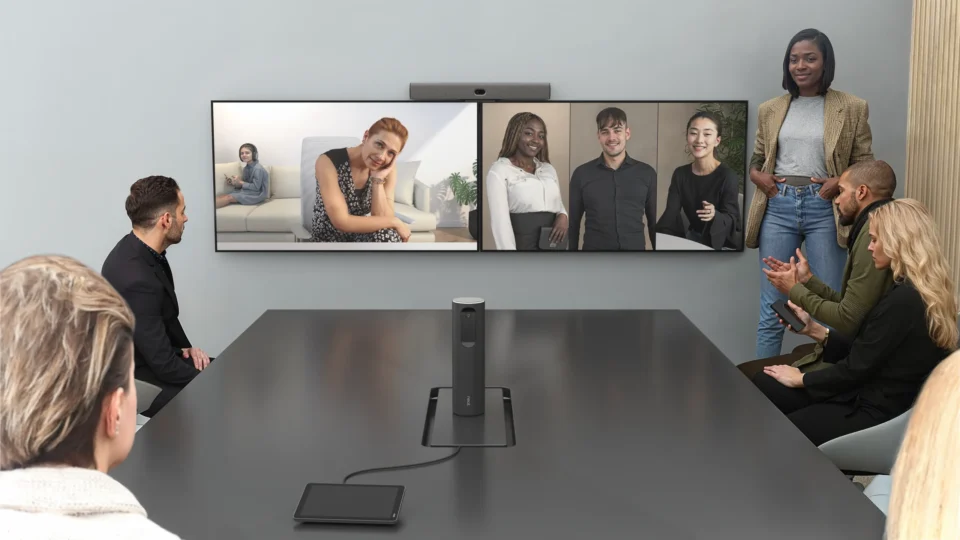
In the past, conference rooms were primarily designed for people physically present in the room. Today, many meetings include a combination of in-person and remote participants. This shift has placed greater emphasis on meeting equity—the principle that everyone should be able to participate effectively regardless of location.
Video bars help support this goal by providing integrated audio and video experiences that make remote participants feel more connected to the conversation.
They also help reduce meeting friction. Employees no longer want to spend valuable meeting time troubleshooting technology, connecting cables, or adjusting multiple devices before a meeting can begin.
By simplifying room technology and reducing the number of individual components required, video bars help organizations create meeting spaces that are easier to use and more reliable.
Research from Microsoft’s Work Trend Index continues to highlight the growing importance of effective collaboration technologies as organizations adapt to flexible ways of working.
The key benefits of using video bars in conference rooms
Video bars offer a range of advantages that extend beyond simply reducing hardware requirements.
Simpler room deployments
One of the most significant benefits is simplicity.
Because cameras, microphones, and speakers are integrated into a single device, organizations can reduce the number of components required in each meeting room. This often results in:
- Faster installation
- Cleaner room aesthetics
- Fewer cables
- Reduced configuration requirements
- Easier room standardization
For IT teams, fewer components generally mean fewer potential points of failure.
Better meeting experiences
Modern video bars are designed to improve collaboration experiences for both in-room and remote participants.
Features such as intelligent framing, speaker tracking, noise suppression, and advanced audio processing help ensure participants can see and hear one another clearly.
This contributes to stronger engagement and more inclusive meetings.
Lower operational complexity
Managing conference room technology can become increasingly challenging as organizations grow.
Video bars simplify management by reducing hardware complexity and supporting centralized monitoring capabilities. This can help organizations:
- Reduce support requests
- Improve device reliability
- Simplify software updates
- Standardize room experiences
These efficiencies can be particularly valuable for organizations managing multiple meeting spaces across different locations.
Future-ready collaboration
Conference room technology continues to evolve rapidly.
Many modern video bars are designed to support emerging workplace requirements, including AI-powered collaboration features, wireless-first meeting experiences, and flexible room configurations.
This helps organizations prepare for future changes without constantly replacing room technology.
Video bars vs traditional conference room systems
Organizations evaluating meeting room technology often compare video bars with more traditional conference room deployments.
While both approaches can support video conferencing, their complexity and management requirements differ significantly.
| Feature | Video bar | Traditional conference room system |
| Installation | Simple | More complex |
| Hardware footprint | Compact | Multiple components |
| Cable management | Minimal | Extensive |
| Deployment time | Faster | Longer |
| Maintenance | Simplified | More involved |
| Scalability | High | Moderate |
| User experience | Streamlined | Can vary significantly |
For many organizations, the simplicity and consistency of video bars make them an attractive choice for modern hybrid work environments.
How to choose the right video bar for your meeting space
Not all video bars are designed for the same environments.
Selecting the right solution starts with understanding how a meeting space will be used.
When evaluating video bars, consider:
- Room size
- Typical participant count
- Collaboration platform requirements
- Audio coverage needs
- AI-powered capabilities
- Device management requirements
- Long-term scalability
The following table provides a useful starting point.
| Room type | Typical capacity | Recommended solution type |
| Focus room | 1–2 | Personal collaboration device |
| Huddle room | 2–6 | Compact video bar |
| Small meeting room | 4–8 | Standard video bar deployment |
| Medium meeting room | 6–12 | Advanced video bar solution |
| Large conference room | 12+ | Expanded room system or multi-device deployment |
Organizations should also consider future requirements rather than focusing solely on current needs.
Building an AI-ready meeting room
Artificial Intelligence (AI) is becoming an increasingly important part of workplace collaboration.
Many organizations now use AI-powered tools to generate meeting summaries, identify action items, provide live transcription, improve accessibility, and help employees retrieve information after meetings have ended.
As these capabilities become standard across collaboration platforms, businesses should consider whether their conference rooms are prepared to support AI-enabled workflows.
High-quality audio and video capture are particularly important because AI systems rely on accurate inputs to deliver reliable outputs.
When evaluating video bars, consider whether they can support:
- Meeting transcription
- Automated summaries
- Speaker identification
- Intelligent camera framing
- AI-powered search and knowledge retrieval
- Accessibility features such as captions and translations
Meeting spaces designed with these capabilities in mind are often better positioned to support future workplace requirements.
Key video conferencing trends shaping conference rooms in 2026
Meeting room technology continues to evolve alongside workplace expectations.
Several trends are influencing how organizations design conference rooms today.
Meeting equity
Organizations increasingly recognize that remote participants should have the same opportunity to contribute as those physically present in the room.
This shift aligns with broader workplace experience trends identified by Leesman Workplace Experience Insights, which consistently show that employees value technologies and environments that support effective collaboration regardless of location.
Reducing meeting friction
Employees expect meetings to start quickly and run smoothly. Simplified room technology, intuitive controls, and integrated devices help reduce delays and improve productivity.
Wireless-first collaboration
Wireless content sharing and simplified room controls are replacing many traditional cable-based workflows.
AI-powered collaboration
AI capabilities are becoming integrated into every stage of the meeting lifecycle, from preparation and participation to follow-up and knowledge management.
Centralized device management
Organizations are increasingly looking for ways to manage room technology across multiple locations from a single platform.
Common mistakes to avoid
Even well-planned conference room projects can encounter challenges.
Some of the most common mistakes include:
- Prioritizing features over usability
- Ignoring room acoustics
- Choosing solutions that do not match room size
- Overcomplicating room deployments
- Failing to consider remote participants
- Neglecting long-term management requirements
- Underestimating future AI requirements
Successful meeting spaces focus on delivering consistent, reliable experiences rather than simply adding more technology.
Where Neat fits in
Video bars have become increasingly popular because they simplify collaboration technology while improving the meeting experience. These same principles are central to Neat’s approach to workplace collaboration.
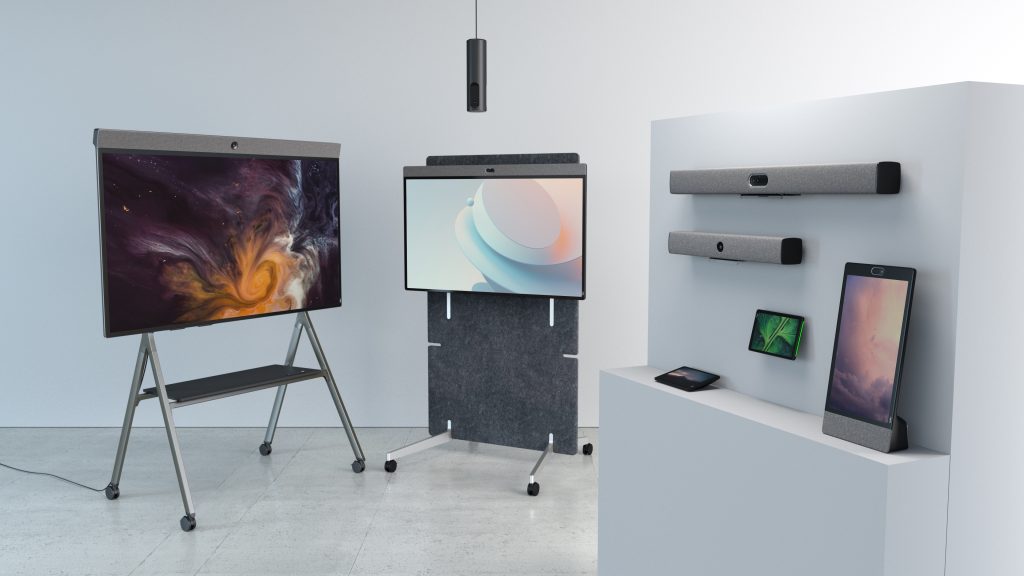
Neat helps organizations create modern meeting spaces by combining intelligent audio, video, content sharing, and device management capabilities into purpose-built solutions designed for hybrid work.
Solutions such as Neat Bar Generation 2 bring together advanced video technology, high-quality audio, intelligent framing, and streamlined deployment in a single device. By reducing hardware complexity and supporting native Zoom and Microsoft Teams experiences, Neat helps organizations create conference rooms that are easier to deploy, manage, and use.
Combined with solutions such as Neat Board 50, Neat Frame, and Neat Pulse, organizations can build a consistent collaboration experience across personal workspaces, huddle rooms, conference rooms, and larger meeting environments.
As workplace expectations continue to evolve, Neat helps organizations reduce meeting friction, improve meeting equity, and create conference rooms that support productive collaboration wherever work happens.
Perhaps it’s time to book a demo and experience them for yourself.
Frequently asked questions
What is a video bar?
A video bar is an all-in-one collaboration device that combines a camera, microphones, speakers, and video conferencing capabilities into a single unit designed for meeting rooms.
Are video bars better than traditional conference room systems?
For many organizations, video bars offer a simpler and more scalable approach to conference room technology. They reduce hardware complexity while providing consistent meeting experiences.
What size room can a video bar support?
This depends on the device and room requirements. Many video bars are well suited to huddle rooms, small meeting rooms, and medium-sized conference spaces, while larger rooms may require expanded deployments.
Do video bars work with Zoom and Microsoft Teams?
Most modern video bars support leading collaboration platforms, including Zoom and Microsoft Teams.
How do AI-powered video bars work?
AI-powered video bars use technologies such as intelligent framing, speaker tracking, noise suppression, and advanced audio processing to improve meeting experiences.
What is meeting equity?
Meeting equity refers to creating meeting experiences where all participants can contribute equally regardless of whether they are attending in person or remotely.
How do I choose the right video bar?
Start by evaluating room size, participant capacity, collaboration platforms, management requirements, and future workplace needs. The best solution should balance performance, usability, and scalability.
Sources
- Microsoft Work Trend Index, Microsoft – https://www.microsoft.com/en-us/worklab/work-trend-index
- Gensler Global Workplace Survey, Gensler – https://www.gensler.com/gri/workplace-surveys
- Leesman Workplace Experience Insights, Leesman – https://www.leesman.com/insights
- International WELL Building Institute – https://www.wellcertified.com/
- Hybrid Work Research, Harvard Business Review – https://hbr.org/topic/hybrid-work





