

Transforming Meeting Room Collaboration: How Integrated Tools Improve Modern Meetings
Hayley Spooner, Jun 2, 2026

Key takeaways
- Use integrated video conferencing systems that support major platforms.
- Ensure compatibility with Microsoft Teams, Zoom, and Google Meet.
- Enable content sharing, whiteboarding, and BYOD workflows.
- Standardize meeting room setups across locations.
- Simplify how meetings start and run.
Meeting room collaboration has evolved rapidly as organizations adopt hybrid work. Meetings now span locations, devices, and platforms, requiring more than just video conferencing. Teams expect to share content, collaborate in real time, and move seamlessly between tools without disruption.
This shift has introduced a new requirement: meeting room systems must integrate with the tools people already use. Without integration, meetings become fragmented. With integration, collaboration becomes natural, consistent, and scalable.
This guide explains how integrated meeting room solutions improve collaboration, and how connecting platforms, devices, and workflows transforms how modern teams work.
What is meeting room collaboration?
Meeting room collaboration refers to how people work together in a shared meeting space using a combination of technology, tools, and processes.
In modern environments, collaboration extends beyond conversation. It includes sharing content, co-creating ideas, and interacting across locations in real time.
This makes integration essential. When systems are connected, meetings flow naturally. When they are not, participants are forced to switch tools, repeat actions, or troubleshoot issues, which reduces productivity.
Core elements of meeting room collaboration
| Element | Description | Why it matters |
| Video communication | Real-time interaction | Enables connection |
| Content sharing | Presenting and reviewing materials | Supports decision-making |
| Collaboration tools | Whiteboards, chat, apps | Enables teamwork |
| Integration | Systems working together | Reduces friction |
| User experience | Ease of use and consistency | Drives adoption |
Why integration matters in modern meetings
Most organizations rely on multiple tools to communicate and collaborate. These tools often include video conferencing platforms, messaging apps, file-sharing systems, and project management tools.
Without integration, these systems operate independently. This creates inefficiencies, as users must switch between tools or duplicate tasks. Meetings become slower, and collaboration becomes less effective.
Integrated meeting room solutions solve this problem by bringing tools together into a single experience. Users can access familiar platforms directly within the meeting room, without additional steps.
Benefits of integrated meeting room systems
| Benefit | Description | Impact |
| Seamless workflows | No switching between tools | Faster meetings |
| Consistent experience | Same interface across rooms | Easier adoption |
| Reduced friction | Fewer technical issues | Higher productivity |
| Platform flexibility | Works across multiple systems | Better collaboration |
| Scalability | Supports growth across locations | Long-term value |
What does integration mean in meeting rooms?
In the context of meeting rooms, integration refers to the ability of hardware, software, and collaboration tools to work together as a unified system.
This includes:
- Native support for conferencing platforms
- Compatibility with external devices and applications
- Unified control of audio, video, and content sharing
- Centralized management of devices and settings
When these elements are integrated, meetings become easier to start, run, and manage.
Integrated vs non-integrated meeting rooms
| Aspect | Non-integrated setup | Integrated setup |
| Meeting start | Multiple steps | One-touch join |
| Tool access | Separate systems | Unified interface |
| Content sharing | Manual setup | Seamless sharing |
| User experience | Inconsistent | Consistent |
| Support required | Frequent IT help | Minimal support |
How integrated systems support conferencing platforms
Modern collaboration depends heavily on conferencing platforms. These platforms provide the foundation for communication, but their effectiveness depends on how well they connect with meeting room systems.
Integrated solutions allow users to join meetings directly from room devices, access scheduled meetings, and use familiar features without additional configuration.
This reduces complexity and ensures that meetings run smoothly from the start.
Supporting collaboration beyond video
Video alone is not enough for effective collaboration. Teams need to interact with content, share ideas, and work together in real time.
Integrated meeting room systems enable this by supporting a range of collaboration workflows. These include screen sharing, whiteboarding, and Bring Your Own Device (BYOD) scenarios.
BYOD allows users to connect their personal devices to the meeting room system while still using the room’s audio and video capabilities. This creates flexibility without sacrificing quality.
Collaboration capabilities enabled by integration
| Capability | Description | Use case |
| Screen sharing | Present content instantly | Reviews and presentations |
| Whiteboarding | Visual collaboration | Brainstorming |
| BYOD support | Connect personal devices | Flexible workflows |
| Multi-user input | Multiple participants contribute | Workshops |
| App integration | Access external tools | Project collaboration |
Creating a consistent meeting experience
Consistency is one of the most important factors in meeting room collaboration. When users encounter different systems in different rooms, it increases friction and reduces confidence.
Integrated solutions create a consistent experience across rooms and locations. Users can start meetings, share content, and collaborate in the same way, regardless of where they are.
This consistency improves adoption and reduces the need for training.
Enabling collaboration at scale
As organizations grow, they need to deploy meeting room solutions across multiple locations. This requires systems that can be managed centrally and updated consistently.
Integrated ecosystems support this by providing centralized device management, remote updates, and performance monitoring. IT teams can ensure that all rooms deliver the same experience, regardless of location.
This scalability is essential for maintaining quality as organizations expand.
Scaling meeting room collaboration
| Requirement | Approach | Result |
| Device management | Centralized control | Consistency |
| Deployment | Standardized setups | Faster rollout |
| Updates | Remote management | Reduced downtime |
| Monitoring | Usage and performance data | Continuous improvement |
Reducing friction in hybrid meetings
Hybrid meetings introduce additional complexity, as participants join from different environments. Integration helps reduce this complexity by simplifying how meetings start and run.
When systems are integrated, users can join meetings instantly, share content without switching devices, and collaborate without interruption.
This reduces delays and improves overall meeting flow.
Common friction points and solutions
| Friction point | Cause | Solution |
| Slow meeting start | Complex setup | One-touch join |
| Poor collaboration | Limited tools | Enable integrations |
| Device switching | Multiple systems | Unified platform |
| User confusion | Inconsistent experience | Standardization |
Common integration challenges
Successfully integrating meeting room technology requires more than connecting devices. Organizations must balance platform compatibility, ease of use, and long-term flexibility.
Common challenges include supporting multiple collaboration platforms, reducing complexity for users, and creating a consistent experience across meeting spaces. Choosing integrated solutions that support a range of workflows can help minimize friction, improve adoption, and simplify management.
Challenges and solutions
| Challenge | Cause | Solution |
| Platform mismatch | Different tools across teams | Use compatible systems |
| Complex setup | Disconnected devices | Use integrated solutions |
| User confusion | Inconsistent interfaces | Standardize experience |
| Limited flexibility | Single-platform dependency | Enable multi-platform support |
Selecting the right collaboration strategy
The right collaboration approach depends on how meeting spaces are used.
Smaller rooms often benefit from simple, integrated video solutions, while collaborative spaces may require interactive displays and whiteboarding capabilities. Larger organizations typically benefit from standardized systems and centralized management that support consistency across locations.
By aligning technology with room requirements and user needs, organizations can create more effective and scalable collaboration experiences.
Choosing the right collaboration approach
| Requirement | Recommended approach |
| Small meeting rooms | Integrated video bar |
| Collaborative spaces | Interactive display |
| Multi-location organizations | Standardized room systems |
| Flexible workstyles | BYOD-enabled rooms |
| Large-scale deployments | Centrally managed ecosystem |
Bringing it all together
Meeting room collaboration is no longer just about connecting people. It is about enabling them to work together effectively, regardless of location.
Integration is central to this shift. By connecting platforms, devices, and workflows, organizations can create meeting environments that are seamless, flexible, and scalable.
When integration is done well, meetings become more efficient and more collaborative. Teams can focus on sharing ideas, solving problems, and making decisions, rather than managing technology.
As hybrid work continues to evolve, integrated meeting room systems will remain essential for building productive and connected organizations.
Where Neat fits in
As organizations scale hybrid work, they need meeting room technology that works consistently across locations, platforms, and room types. This is where integrated collaboration devices can make a significant difference.
Neat solutions are designed to simplify meeting room collaboration by bringing together video, audio, content sharing, and device management into a single experience. Rather than requiring separate systems for conferencing, collaboration, and room control, Neat devices are built to support the workflows modern teams use every day.
The Neat Board 50 combines a multi-touch display, intelligent camera system, microphones, speakers, and whiteboarding capabilities into a single device. This helps teams move seamlessly between meetings, content sharing, brainstorming sessions, and collaborative work.
For small and medium-sized meeting rooms, the Neat Bar Generation 2 delivers advanced video and audio capabilities in a compact form factor. With AI-powered framing, improved processing performance, and support for leading collaboration platforms, it helps create a more natural experience for both in-room and remote participants.
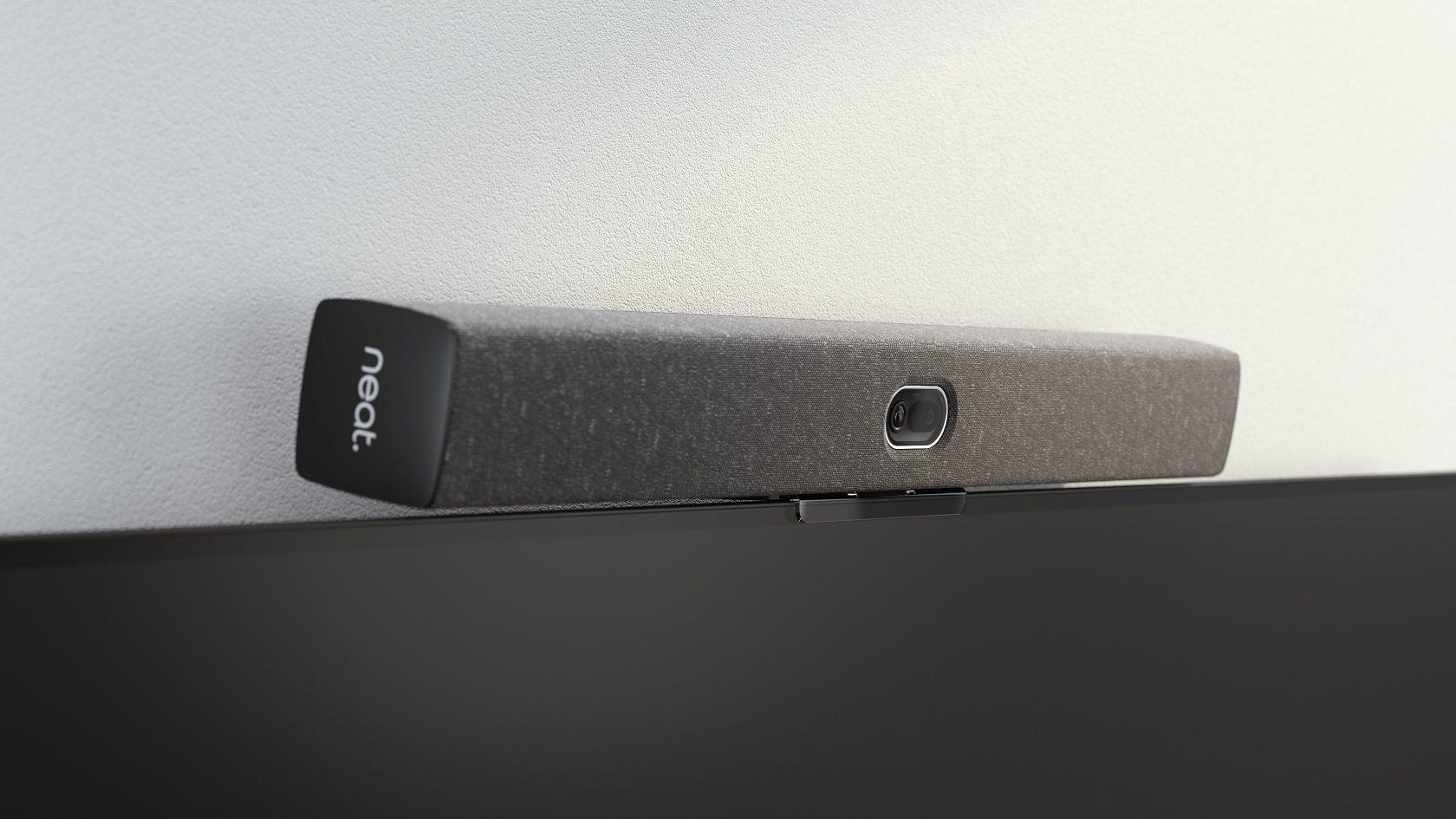
By integrating conferencing, collaboration, content sharing, and device management into a unified experience, Neat helps organizations remove many of the friction points that commonly affect modern meeting room collaboration.
These devices support many of the principles discussed throughout this guide, including:
- Platform flexibility
- Consistent user experiences
- Simplified meeting starts
- Better hybrid collaboration
- Reduced technology friction
As meeting room collaboration becomes increasingly dependent on connected workflows, integrated devices help organizations create environments that are easier to manage, easier to use, and more effective for teams.
Book a demo or explore our range of devices today.
Frequently asked questions
What is meeting room integration?
Meeting room integration is the process of connecting conferencing platforms, collaboration tools, room hardware, and management systems into a unified environment that simplifies meetings and improves collaboration.
Why is meeting room integration important?
Integration reduces friction, improves usability, and allows teams to collaborate more effectively without switching between disconnected tools and systems.
Can meeting rooms support multiple collaboration platforms?
Yes. Modern meeting room systems can support platforms such as Microsoft Teams, Zoom, and Google Meet, allowing organizations to accommodate different workflows and user preferences.
What is BYOD in meeting rooms?
Bring Your Own Device (BYOD) allows participants to connect personal laptops or mobile devices to meeting room technology while still using room cameras, microphones, and speakers.
How does integration improve hybrid meetings?
Integrated systems simplify meeting starts, enable seamless content sharing, improve participant experiences, and reduce the technical issues that commonly disrupt hybrid collaboration.
What should organizations look for in an integrated meeting room solution?
Organizations should prioritize platform compatibility, ease of use, centralized management, collaboration features, scalability, and support for hybrid work environments.
Sources
Stanford Institute for Economic Policy Research: Hybrid Is the Future of Work
World Wide Web Consortium (W3C) Accessibility Initiative
AVNetwork: AV/IT Technologies Supporting a Culture of Collaboration