


Tips for a Smooth Video Conference Install
Hayley Spooner, Jun 22, 2026
Key takeaways
- Successful video conferencing installs depend as much on planning and room design as the hardware itself.
- Poor audio, weak networking, and overly complicated room setups are still the most common causes of meeting frustration.
- In 2026, organizations increasingly prioritize appliance-based conferencing systems because they simplify deployment and reduce support overhead.
- Standardized conference room technology improves usability, scalability, and long-term IT management.
- Hybrid meeting rooms should be designed equally for remote and in-room participants.
- AI-powered meeting features are changing how businesses think about conference room layouts, displays, and collaboration workflows.
Quick answer: How do you ensure a video conferencing install runs smoothly?
The best way to ensure a smooth video conferencing installation is to focus on simplicity, room planning, reliable networking, strong audio coverage, and consistent room standards across the organization.
Most successful deployments prioritize:
- Ease of use
- Reliable meeting startup
- Standardized technology
- Strong audio quality
- Long-term manageability
The conference rooms employees enjoy using are usually the ones that feel effortless.
Why video conferencing installs matter more in 2026
Why video conferencing installs matter more in 2026
Video conferencing is no longer a workplace convenience—it has become a core part of how organizations operate. Hybrid work has fundamentally changed the way employees collaborate, making meeting room technology a critical piece of workplace infrastructure rather than an optional IT project.
As a result, conference room installations now have a direct impact on employee productivity, customer interactions, workplace flexibility, and overall user experience. When meeting rooms are difficult to use or unreliable, the effects are felt immediately across the organization.
At the same time, conference room technology has become more sophisticated. Many organizations are deploying cameras powered by Artificial Intelligence (AI), intelligent audio systems, wireless content sharing, occupancy analytics, and cloud-based collaboration platforms. While these capabilities can significantly improve the meeting experience, they also increase the importance of thoughtful planning and long-term management.
The organizations seeing the strongest results are often those that focus on simplicity. Rather than adding technology for technology’s sake, they design meeting spaces around the needs of users and create consistent experiences that employees can rely on every day.
1. Start with the room, not the hardware
One of the biggest mistakes organizations make is choosing conferencing hardware before evaluating the room itself.
The physical space determines almost everything about the meeting experience, including:
- Camera positioning
- Audio coverage
- Display visibility
- Lighting conditions
- Acoustic quality
- Cable management
- Seating layouts
A poorly designed room can undermine even premium conferencing systems.
Before selecting technology, businesses should evaluate room size, participant positioning, ceiling height, natural lighting, network access, and acoustic conditions. Hybrid meeting rooms should also be designed around remote participants rather than only the people physically present in the room.
Room planning checklist
| Consideration | Why it matters |
| Room size | Determines camera and audio requirements |
| Seating layout | Affects participant visibility |
| Acoustics | Impacts meeting clarity |
| Lighting | Improves camera quality |
| Network access | Supports stable meetings |
| Display placement | Improves collaboration visibility |
The most effective meeting rooms are the ones designed intentionally around collaboration workflows rather than simply fitting technology into existing spaces.
2. Prioritize audio quality above everything else
Poor audio remains the single biggest cause of frustrating video meetings.
Organizations often focus heavily on cameras and displays while underestimating how much sound quality affects collaboration. In reality, employees can tolerate imperfect video more easily than poor audio.
Meeting room audio issues commonly include:
- Echo
- Background noise
- Uneven microphone pickup
- Reverberation
- HVAC interference
- Weak speaker placement
Common conference room audio problems
| Audio issue | Common cause |
| Echo | Poor acoustic treatment |
| Muffled voices | Weak microphone coverage |
| Background noise | Open office environments |
| Inconsistent volume | Poor speaker placement |
| Audio dropouts | Network instability |
In 2026, many organizations are investing more heavily in beamforming microphones, AI-powered noise suppression, ceiling microphone arrays, and acoustic treatment because these improvements often have a greater impact on meeting quality than upgrading cameras alone.
3. Keep the meeting room experience simple
The best conference rooms are the ones employees can use immediately without training or technical assistance.
Employees increasingly expect:
- One-touch meeting join
- Wireless sharing
- Automatic camera framing
- Fast meeting startup
- Consistent room controls
Complicated Audio Visual (AV) systems often create:
- Longer meeting delays
- More IT support tickets
- User frustration
- Lower room utilization
This is one reason appliance-based conferencing systems have become increasingly popular in hybrid workplaces. Integrated systems reduce the number of separate components employees need to interact with during meetings.
What employees expect from modern meeting rooms
| User expectation | Why it matters |
| One-touch join | Faster meeting startup |
| Wireless content sharing | Less setup friction |
| Automatic framing | Better hybrid experience |
| Consistent room controls | Easier usability |
| Reliable startup | Fewer meeting delays |
The simpler the room experience, the more consistently employees will use the technology correctly.
4. Standardize room technology across offices
Organizations often focus heavily on the initial installation but underestimate the operational effort required to manage meeting rooms over time. While a handful of rooms may be manageable manually, the challenge grows significantly as deployments expand across multiple offices and locations.
Centralized management platforms, remote monitoring, automated updates, and device analytics have become increasingly important for IT teams. These capabilities help organizations maintain consistent room experiences, identify issues before users report them, and reduce the time spent troubleshooting individual spaces.
As conference room technology becomes more connected and intelligent, long-term manageability should be considered from the beginning of any deployment project rather than as an afterthought.
5. Ensure strong network performance
Even the best conferencing hardware performs poorly on unstable networks.
Modern conferencing systems rely heavily on cloud connectivity, wireless collaboration, AI-powered features, and real-time video processing. Weak network infrastructure can quickly cause:
- Audio dropouts
- Frozen video
- Delayed screen sharing
- Failed AI features
- Poor overall meeting quality
Organizations should work closely with IT teams to evaluate:
- Wi-Fi coverage
- Bandwidth capacity
- Quality of Service (QoS) configuration
- Wired connectivity
- Security policies
Network considerations for hybrid meeting rooms
| Network factor | Why it matters |
| Bandwidth | Supports stable video streams |
| Wi-Fi coverage | Prevents connection issues |
| QoS settings | Prioritizes conferencing traffic |
| Virtual Local Area Network (VLAN) segmentation | Improves security |
| Wired connectivity | Increases reliability |
As AI-powered conferencing becomes more common, stable networking is becoming even more important for smooth meeting experiences.
6. Plan for AI-powered collaboration
Artificial intelligence is rapidly changing conference room design.
Modern conferencing systems increasingly support:
- Intelligent framing
- Automatic speaker tracking
- Real-time captions
- AI-generated meeting summaries
- Occupancy analytics
- Smart camera switching
These capabilities improve hybrid meeting experiences, but they also affect room layouts, display positioning, network requirements, and camera placement.
Organizations designing new meeting spaces should think beyond current workflows and consider how AI collaboration features may evolve over the next several years.
Conference rooms are increasingly becoming intelligent collaboration environments rather than static AV spaces.
7. Think long-term about device management
Many organizations underestimate how difficult conference room management becomes at scale.
A few meeting rooms may seem manageable manually. But dozens or hundreds of rooms across multiple offices quickly create operational complexity.
Organizations should prioritize:
- Centralized management platforms
- Remote monitoring
- Automatic updates
- Device analytics
- Health monitoring
- Standardized configurations
Important IT management capabilities
| Capability | Benefit |
| Remote monitoring | Faster troubleshooting |
| Automatic updates | Better security and stability |
| Device analytics | Improved room utilization insights |
| Centralized management | Lower operational overhead |
| Standardized configurations | More consistent experiences |
Long-term manageability is now one of the most important considerations in enterprise conferencing deployments.
8. Design conference rooms for hybrid meetings first
One of the biggest shifts in workplace design is that conference rooms are no longer built primarily for people physically in the room.
Modern meeting spaces need to create equitable experiences for:
- Remote employees
- In-office employees
- Customers
- External partners
- Distributed teams
This changes how organizations think about:
- Camera angles
- Display placement
- Table layouts
- Microphone coverage
- Lighting
- Collaboration workflows
The best hybrid meeting rooms make remote participants feel fully included rather than secondary to in-room attendees.
Common video conferencing installation mistakes
Many conferencing deployments struggle because organizations overcomplicate room technology or fail to plan for long-term usability.
Most common conferencing install mistakes
| Mistake | Impact |
| Poor audio planning | Frustrating meetings |
| Overly complex systems | Higher support needs |
| Inconsistent room standards | User confusion |
| Weak networking | Unstable meetings |
| Poor camera placement | Reduced visibility |
| Ignoring acoustics | Lower collaboration quality |
| Lack of device management | Operational complexity |
The most successful conference room installs are usually the ones employees barely need to think about.
Video conferencing install checklist
Organizations planning conferencing installs should confirm:
- Room layouts are finalized
- Audio coverage is validated
- Network capacity is tested
- Display visibility is optimized
- Lighting conditions are reviewed
- Platform compatibility is confirmed
- Device management tools are configured
- Standardized room designs are documented
Simple, repeatable room designs are generally easier to scale and support long-term.
Where Neat fits in
Successful video conferencing installs are about much more than selecting hardware. The most effective meeting room deployments focus on simplicity, audio quality, hybrid collaboration, standardization, device management, and long-term scalability.
This is where appliance-based collaboration systems can play an important role. As organizations standardize conferencing technology across offices, many are moving away from heavily customized AV environments in favor of integrated solutions that are easier to deploy, manage, and use consistently.
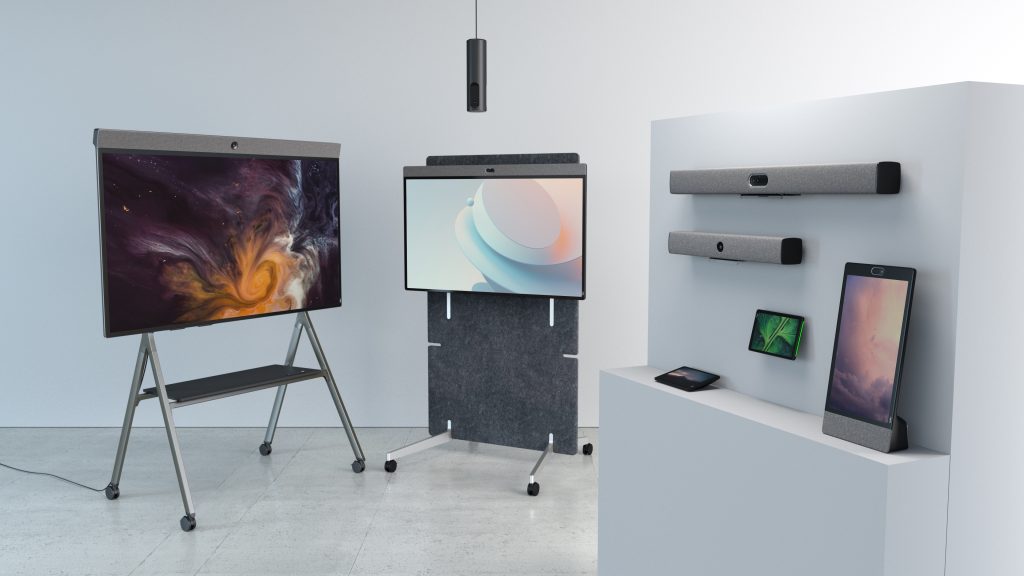
Neat devices are designed around this approach. Solutions such as Neat Bar Generation 2, Neat Bar Pro, Neat Board 50, and Neat Pad combine collaboration hardware, intelligent audio and video technology, and streamlined management capabilities into purpose-built systems for Zoom and Microsoft Teams environments. By reducing the number of separate components required in a room, organizations can simplify installation, improve reliability, and create more consistent meeting experiences.
Neat solutions are commonly used across huddle rooms, small and medium conference rooms, executive meeting spaces, and flexible collaboration environments. Features such as intelligent framing, high-quality audio pickup, simple room controls, and centralized management support many of the priorities highlighted throughout this guide.
As hybrid work continues to evolve, organizations are increasingly looking for conference room technology that balances ease of deployment, usability, intelligent collaboration features, and long-term scalability. For businesses aiming to reduce meeting friction and create conference rooms employees actually enjoy using, standardized appliance-based systems and thoughtfully designed meeting spaces often deliver the strongest long-term results.
Perhaps it’s time to book a demo and experience them for yourself.
Frequently asked questions
What is the most important part of a video conferencing install?
Audio quality is usually the most important factor because poor sound impacts every participant immediately.
Should conference rooms use wireless presentation systems?
Yes. Wireless sharing reduces friction and improves meeting startup times in hybrid environments.
How many displays should a conference room have?
Small rooms may only need one display, while medium and large rooms increasingly use dual-display setups for hybrid collaboration.
Are appliance-based conferencing systems better?
For many organizations, appliance-based systems simplify deployment, reduce operational complexity, and improve reliability compared to heavily customized AV systems.
Why do conference room installs fail?
Most failures involve poor planning, inconsistent room standards, weak networking, complicated controls, or inadequate audio coverage.
Sources
- AVNetwork — Pro AV Trends for Hybrid Workplaces
https://www.avnetwork.com/news/trends-2026-pro-av-hangs-tough - StackedAV — Meeting Room AV Trends for 2026
https://www.stackedav.ie/meeting-room-av-trends-for-2026-what-smart-businesses-are-investing-in/ - Microsoft — Microsoft Teams Rooms Documentation
https://learn.microsoft.com/en-us/microsoftteams/rooms/ - Zoom — Zoom Rooms Best Practices
https://support.zoom.com/hc/en/article?id=zm_kb&sysparm_article=KB0063453 - Commercial Integrator — Conference Room Design Best Practices
https://www.commercialintegrator.com/av/conference-room-design/





