


Meeting Space Collaboration Systems: How to Design Connected Workspaces for Hybrid Teams in 2026
Hayley Spooner, Jun 24, 2026
Key takeaways
- Meeting space collaboration systems connect people, technology, and workspaces to support seamless collaboration.
- Hybrid work requires meeting spaces that provide equitable experiences for both remote and in-office participants.
- Modern collaboration systems combine video, audio, content sharing, room management, and AI-powered capabilities.
- Simplicity and ease of use are often more important than adding more technology.
- Different workspace types require different collaboration solutions.
- AI-powered meeting tools are becoming standard across modern workplaces.
- Organizations should prioritize flexible, future-ready systems that can adapt to evolving workplace needs.
Organizations have spent the past several years rethinking how people collaborate. Research from Gensler’s Global Workplace Survey continues to highlight the growing importance of collaboration spaces as organizations adapt their workplaces for hybrid work. As hybrid work becomes a permanent feature of modern business, meeting spaces are evolving from simple conference rooms into connected collaboration environments designed to support both in-person and remote participants.
Today’s employees expect meetings to be easy to join, content to be simple to share, and conversations to feel inclusive regardless of location. At the same time, organizations want to maximize office utilization, improve productivity, and create workplaces that attract employees back into the office.
Meeting space collaboration systems play a critical role in achieving these goals. By combining video conferencing, content sharing, audio, displays, and intelligent workplace technologies, these systems help teams work together more effectively wherever they are.
This guide explores what meeting space collaboration systems are, why they matter, and how organizations can design connected workspaces that support the needs of hybrid teams in 2026 and beyond.
What is a meeting space collaboration system?
A meeting space collaboration system is a combination of hardware, software, and workplace technologies that enables people to communicate, collaborate, and share information effectively within a meeting space.
Unlike traditional conference room setups that focused primarily on video conferencing, modern collaboration systems are designed to support a broader range of interactions. They help connect in-room participants with remote colleagues, facilitate content sharing, enable brainstorming sessions, and increasingly provide meeting assistance powered by Artificial Intelligence (AI).
The goal is to create a seamless collaboration experience regardless of where participants are located.
A modern meeting space collaboration system typically includes:
- Cameras and video technology
- Microphones and speakers
- Meeting room displays
- Wireless content sharing
- Collaboration software
- Room scheduling and management tools
- AI-powered meeting features
The most successful systems reduce friction and allow teams to focus on conversations and decision-making rather than technology.
Why meeting space collaboration systems matter more than ever
The workplace has fundamentally changed. According to research from Microsoft’s Work Trend Index, employees increasingly expect flexible work arrangements and better collaboration experiences regardless of where they work.
As organizations adopt hybrid work models, meeting spaces must support a wider range of use cases than ever before. Employees may be collaborating with colleagues across different offices, engaging with customers remotely, or participating in global project teams.
Without the right collaboration technology, meetings can become fragmented. Remote participants may struggle to hear conversations, contribute ideas, or stay engaged.
Modern collaboration systems help address these challenges by creating more inclusive meeting experiences. They improve communication, reduce technical barriers, and ensure all participants can contribute effectively.
They also help organizations:
- Improve meeting productivity
- Support hybrid work initiatives
- Enhance employee experience
- Reduce technology complexity
- Increase workspace utilization
- Strengthen collaboration across distributed teams
The essential components of a modern collaboration system
While collaboration systems vary depending on room size and use case, most modern deployments share a common set of components.
| Component | Purpose |
| Camera systems | Capture participants and meeting activity |
| Microphones | Ensure voices are heard clearly |
| Speakers | Deliver clear audio to all participants |
| Displays | Support video conferencing and content sharing |
| Collaboration software | Connect participants and workflows |
| Room scheduling tools | Improve space utilization |
| AI capabilities | Automate tasks and enhance productivity |
These technologies work together to create a connected collaboration environment that supports both structured meetings and spontaneous teamwork.
Increasingly, organizations are prioritizing integrated solutions that reduce the number of separate devices required within a room. This simplifies deployment, reduces support requirements, and improves the overall user experience.
How to choose the right collaboration system for your workspace
Selecting the right collaboration system starts with understanding how people use your spaces.
Many organizations make the mistake of focusing solely on technology specifications. While performance matters, user experience is often the most important factor. A system that is simple and reliable will typically deliver greater value than one packed with features that employees rarely use.
When evaluating collaboration systems, consider:
- Room size and capacity
- Meeting frequency
- Hybrid participation requirements
- Existing collaboration platforms
- IT management capabilities
- Long-term scalability
- Ease of deployment and maintenance
Organizations should also think about future workplace requirements. Collaboration technology investments often remain in place for several years, making flexibility and adaptability critical considerations.
Collaboration systems for different meeting spaces
Different spaces require different approaches to collaboration.
A one-size-fits-all strategy rarely delivers the best results because each room type serves a unique purpose within the workplace.
| Space type | Typical capacity | Collaboration requirements |
| Personal workspace | 1 | Individual video collaboration |
| Focus room | 1–2 | Private calls and focused work |
| Huddle room | 2–6 | Quick team collaboration |
| Small meeting room | 4–8 | Hybrid meetings and presentations |
| Medium meeting room | 6–12 | Structured team meetings |
| Large conference room | 12+ | Advanced video and audio coverage |
| Multi-purpose space | Varies | Flexible collaboration scenarios |
Organizations that align collaboration technology with room purpose are often able to create more effective and engaging workplace experiences.
Key collaboration trends shaping workplaces in 2026
Meeting space collaboration systems continue to evolve alongside workplace expectations and technology advancements.
Several trends are shaping how organizations design connected workspaces today.
AI-powered meeting experiences
AI is becoming an increasingly important part of workplace collaboration. Automatic note-taking, meeting summaries, intelligent camera framing, speaker identification, and task extraction are helping teams spend less time on administration and more time on meaningful work.
Meeting equity
Meeting equity focuses on ensuring every participant has an equal opportunity to contribute regardless of location. This shift is closely aligned with broader workplace experience trends identified by Leesman Insights, which consistently show that employees value technology and environments that support effective collaboration wherever they work. This principle has become a major consideration in workplace design and technology selection.
Wireless-first collaboration
Organizations are moving away from complex cable-based meeting room setups. Wireless content sharing and simplified room controls help reduce friction and improve meeting efficiency.
Flexible workspaces
Offices are becoming more adaptable, with rooms designed to support multiple activities throughout the day. Collaboration technology must be equally flexible to support changing requirements.
Workplace analytics
Organizations increasingly use occupancy data and room utilization insights to optimize office layouts and improve workplace investments.
Common mistakes to avoid
Even well-intentioned collaboration projects can encounter challenges.
Some of the most common mistakes include:
- Overcomplicating the user experience
- Choosing technology that does not match room size
- Ignoring audio quality
- Failing to consider remote participants
- Neglecting room acoustics
- Underestimating ongoing management requirements
- Designing spaces around technology instead of people
Successful collaboration environments are built around user needs first and technology second.
Where Neat fits in
The most effective meeting space collaboration systems share several characteristics: they are simple to use, easy to manage, and designed to create equitable experiences for every participant.
These principles are central to Neat’s approach to workplace collaboration.
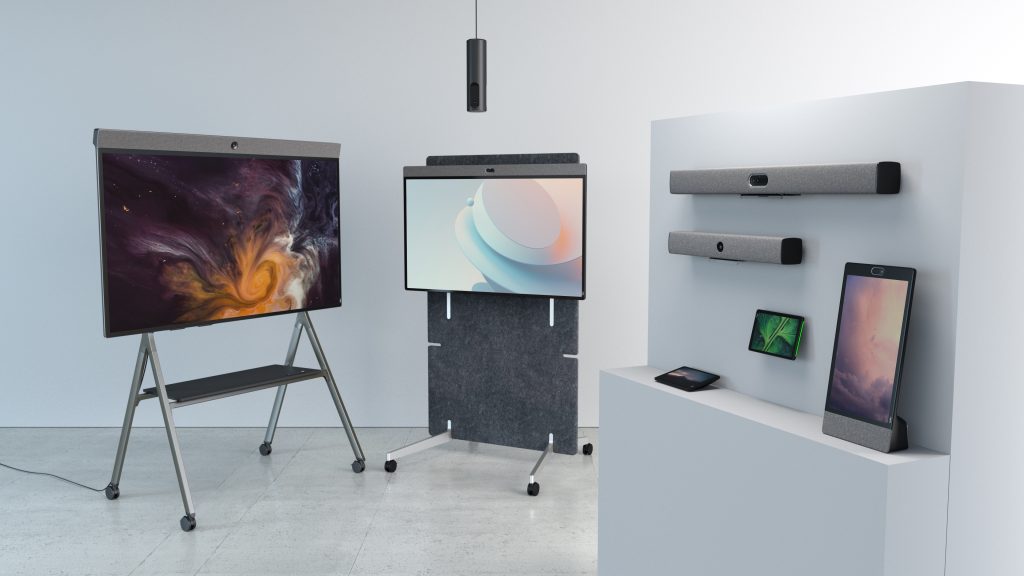
Neat’s portfolio helps organizations create connected workspaces by combining intelligent audio, video, content sharing, and workspace management capabilities into purpose-built devices designed for modern collaboration.
Whether supporting individual workspaces with Neat Frame, enabling hybrid collaboration in small and medium meeting rooms with Neat Bar Generation 2, or creating interactive team experiences with Neat Board 50, Neat helps organizations simplify room design while delivering consistent meeting experiences.
Neat’s solutions support leading collaboration platforms, including Zoom and Microsoft Teams, while helping reduce hardware complexity and IT overhead. Features such as intelligent framing, wireless collaboration, and centralized device management help organizations create meeting spaces that are both easier to use and easier to scale.
As workplace expectations continue to evolve, Neat helps organizations build connected workspaces that support collaboration wherever work happens.
Perhaps it’s time to book a demo and experience them for yourself.
Frequently asked questions
What is a meeting space collaboration system?
A meeting space collaboration system is a combination of hardware, software, and workplace technologies that enables people to communicate, collaborate, and share information effectively in a meeting environment.
What technology is required for a hybrid meeting room?
Most hybrid meeting rooms require cameras, microphones, speakers, displays, content sharing capabilities, and collaboration software. Many organizations also adopt AI-powered meeting tools and room management solutions.
What is meeting equity?
Meeting equity refers to creating an experience where all participants can contribute equally regardless of whether they are attending in person or remotely.
How do collaboration systems improve productivity?
Collaboration systems reduce technical barriers, improve communication, streamline meetings, and help teams share information more effectively, leading to more productive interactions.
What’s the difference between a video conferencing system and a collaboration system?
Video conferencing is typically one component of a collaboration system. Modern collaboration systems also include content sharing, workspace management, AI capabilities, room scheduling, and tools that support broader teamwork and productivity.
How is AI changing workplace collaboration?
AI is helping automate tasks such as note-taking, transcription, meeting summaries, speaker identification, and action-item tracking. These capabilities help teams focus more on discussion and decision-making.
How do I choose the right collaboration system for my organization?
Start by evaluating room types, user needs, collaboration platforms, IT resources, and future workplace requirements. The best solution should balance performance, simplicity, scalability, and ease of management.
Sources
- Microsoft Work Trend Index, Microsoft – https://www.microsoft.com/en-us/worklab/work-trend-index
- Gensler Global Workplace Survey, Gensler – https://www.gensler.com/gri/workplace-surveys
- Leesman Workplace Experience Insights, Leesman – https://www.leesman.com/insights
- International WELL Building Institute – https://www.wellcertified.com/
- Hybrid Work Research, Harvard Business Review – https://hbr.org/topic/hybrid-work





