


How to Set up a Conference Room for a Hybrid Office in 2026
Hayley Spooner, Jun 24, 2026
Key takeaways
- Hybrid conference rooms should create equitable experiences for both in-person and remote participants.
- Successful meeting spaces combine high-quality audio, video, content sharing, and intuitive room controls.
- Room design should prioritize usability and collaboration rather than simply adding more technology.
- Different room sizes require different conferencing solutions.
- AI-powered meeting tools are becoming a standard part of modern workplace collaboration.
- Acoustics, lighting, and furniture have a significant impact on meeting quality.
- Organizations should invest in flexible meeting room technology that can adapt to future workplace needs.
The hybrid workplace is no longer an emerging trend—it’s the reality for many organizations in 2026. Employees increasingly split their time between home, the office, and other locations, creating new expectations around how meetings are conducted.
A conference room designed for a fully office-based workforce often struggles to support today’s collaboration needs. Remote participants can feel disconnected, technology can become a barrier rather than an enabler, and poorly designed spaces can reduce productivity instead of improving it.
Research from Microsoft’s Work Trend Index continues to show the importance of flexible work and effective collaboration technologies as organizations adapt to evolving workplace expectations.
The most effective hybrid conference rooms create a seamless experience for everyone involved, regardless of where they are joining from. This guide explores how organizations can design, equip, and optimize conference rooms for hybrid work in 2026 and beyond.
What is a hybrid conference room?
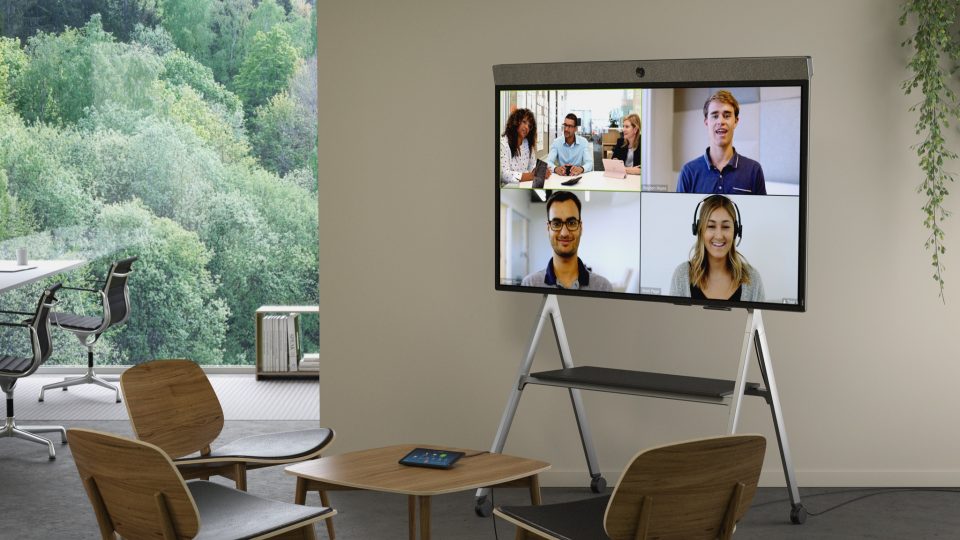
A hybrid conference room is a meeting space specifically designed to support both in-person and remote participants.
Unlike traditional conference rooms, hybrid meeting spaces prioritize meeting equity. The goal is to ensure everyone can see, hear, participate, and collaborate effectively regardless of location.
A modern hybrid conference room typically combines:
- Video conferencing technology
- High-quality microphones and speakers
- Meeting room displays
- Wireless content sharing
- Collaboration software
- Intelligent camera systems
- AI-powered meeting tools
When these components work together effectively, meetings feel more natural, inclusive, and productive.
Why conference room design matters in hybrid workplaces
The quality of a meeting room has a direct impact on collaboration.
Employees today spend significant portions of their workweek in meetings. When technology is difficult to use or remote participants struggle to engage, productivity suffers and frustration increases.
Research from Gensler’s Global Workplace Survey highlights the growing importance of workplace environments that support collaboration, flexibility, and employee experience.
Well-designed hybrid conference rooms help organizations:
- Improve communication across distributed teams
- Create more inclusive meetings
- Reduce technical issues and delays
- Support flexible work arrangements
- Improve employee experience
- Increase return on workplace investments
The goal is not simply to install more technology but to create spaces that help people work together effectively.
Reducing meeting friction
As hybrid work has matured, organizations have become increasingly focused on reducing meeting friction—the small technology and process issues that disrupt collaboration.
Delayed meeting starts, unreliable room technology, poor audio quality, difficult content sharing, and complicated room controls can all create unnecessary frustration for employees. While these issues may seem minor individually, their cumulative impact can significantly affect productivity and employee experience.
The most effective hybrid conference rooms are designed to remove these barriers. Meetings should be easy to join, content should be simple to share, and participants should be able to collaborate without needing technical assistance. Reducing meeting friction helps teams spend less time troubleshooting technology and more time focusing on meaningful work.
The essential technology for a hybrid conference room
Technology forms the foundation of every hybrid meeting space.
The most successful conference rooms balance performance with simplicity. Employees should be able to enter the room, start a meeting, and begin collaborating with minimal effort.
| Technology | Purpose |
| Camera system | Captures participants and meeting activity |
| Microphones | Ensures every voice is heard clearly |
| Speakers | Delivers clear audio for remote participants |
| Meeting room display | Supports video conferencing and presentations |
| Wireless content sharing | Simplifies collaboration |
| Collaboration platform | Connects teams across locations |
| AI-powered tools | Automates meeting tasks and improves productivity |
Integrated systems are increasingly popular because they reduce complexity, simplify deployment, and improve reliability.
Building an AI-ready conference room
Artificial Intelligence (AI) is rapidly becoming a core part of the modern meeting experience.
Many organizations now use AI-powered tools to generate meeting summaries, identify action items, provide live transcription, improve accessibility, and help employees retrieve information long after a meeting has ended.
As these capabilities become standard across collaboration platforms, businesses should consider whether their conference rooms are prepared to support AI-enabled workflows. High-quality audio and video capture are particularly important because AI systems depend on accurate inputs to deliver reliable outputs.
When evaluating conference room technology, consider whether your meeting spaces can support:
- Meeting transcription
- Automated summaries
- Speaker identification
- Intelligent camera framing
- AI-powered search and knowledge retrieval
- Accessibility features such as captions and translations
Conference rooms designed with these capabilities in mind are often better positioned to support future workplace requirements as AI continues to evolve.
Choosing the right conference room setup for your space
Not every conference room has the same requirements.
A small huddle room used for quick team discussions will require a different setup than a large boardroom hosting executive presentations or customer meetings.
Organizations should evaluate meeting room requirements based on:
- Room size
- Participant capacity
- Typical meeting types
- Hybrid participation needs
- Existing collaboration platforms
- IT management resources
The following framework can help guide technology selection:
| Room type | Capacity | Recommended approach |
| Focus room | 1–2 | Personal collaboration device |
| Huddle room | 2–6 | All-in-one collaboration system |
| Small meeting room | 4–8 | Integrated video conferencing solution |
| Medium meeting room | 6–12 | Video bar and display setup |
| Large conference room | 12+ | Advanced multi-camera deployment |
Choosing technology that aligns with room purpose helps improve both usability and meeting quality.
Designing a conference room for meeting equity
Meeting equity has become one of the most important concepts in workplace collaboration.
The principle is simple: remote participants should have the same opportunity to contribute as those physically present in the room.
Research from Leesman Insights consistently shows that employees value environments and technologies that support effective collaboration regardless of location.
Creating meeting equity often involves:
- Positioning cameras at natural eye level
- Ensuring clear audio coverage throughout the room
- Using displays that allow remote participants to remain visible
- Supporting wireless content sharing
- Minimizing technical barriers to participation
Organizations that prioritize meeting equity often see stronger engagement, improved collaboration, and better meeting outcomes.
Optimizing lighting, acoustics, and room layout
Technology alone cannot create a successful hybrid meeting experience.
The physical environment plays an equally important role.
Poor lighting can affect camera quality, making participants appear unclear or poorly lit. Similarly, poor acoustics can undermine even the most advanced conferencing technology.
Several design considerations can significantly improve meeting quality:
Lighting
Natural light remains the preferred option whenever possible. Where natural light is limited, layered lighting can help create a more comfortable and professional meeting environment.
Acoustics
Acoustic panels, soft furnishings, rugs, and sound-absorbing materials help reduce echo and improve audio clarity.
Furniture
Flexible furniture allows rooms to support different meeting styles while maximizing available space.
Room layout
Meeting spaces should encourage participation while ensuring all attendees remain visible and audible throughout the meeting.
These elements often have a greater impact on meeting quality than organizations initially realize.
Key hybrid meeting room trends shaping workplaces in 2026
Hybrid meeting spaces continue to evolve alongside workplace expectations and technology advancements.
Several trends are influencing conference room design today.
AI-powered meeting assistance
Automatic note-taking, meeting summaries, action-item tracking, and intelligent camera framing are helping teams spend less time on administration and more time on collaboration.
Wireless-first collaboration
Organizations are increasingly eliminating cables and adapters in favor of wireless content sharing and simplified room controls.
Flexible workspaces
Meeting rooms are being designed to support multiple activities throughout the day, from presentations and workshops to video meetings and focused collaboration.
Workspace analytics
Organizations are using room utilization data and occupancy insights to optimize office layouts and improve workplace investments.
Simplicity by design
Many businesses are moving away from complex meeting room ecosystems and toward integrated solutions that are easier to deploy, manage, and use.
Common mistakes to avoid
Even well-planned conference room projects can fall short if common challenges are overlooked.
Some of the most frequent mistakes include:
- Prioritizing technology over user experience
- Choosing solutions that do not fit room size
- Neglecting audio quality
- Ignoring room acoustics
- Failing to consider remote participants
- Overcomplicating meeting room controls
- Underestimating long-term management requirements
Successful hybrid conference rooms focus on people first and technology second.
Where Neat fits in
The most effective hybrid conference rooms are designed around simplicity, flexibility, and meeting equity. These same principles guide Neat’s approach to workplace collaboration.
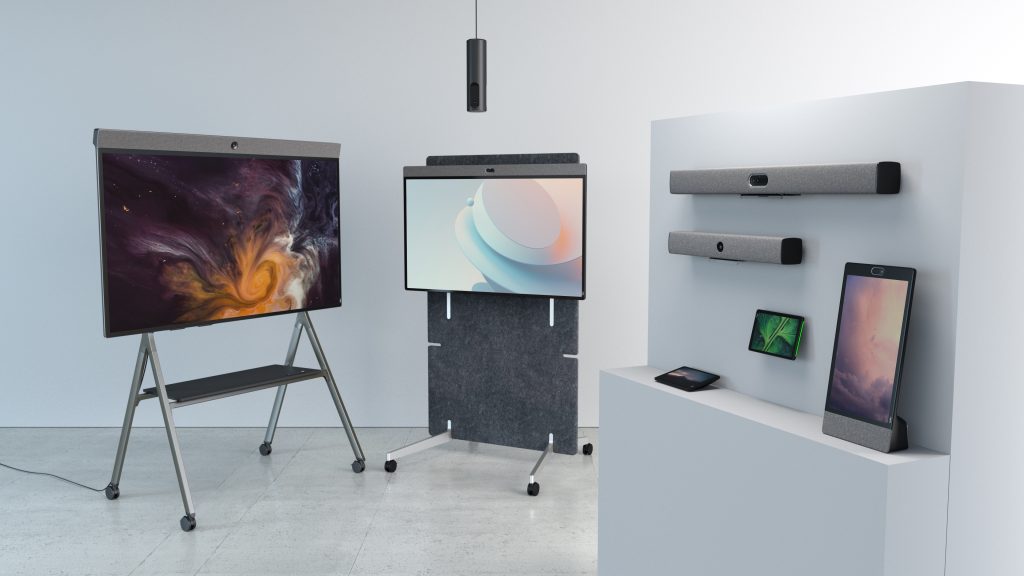
Neat’s portfolio is designed to help organizations create meeting spaces that support both in-person and remote participants without introducing unnecessary complexity. By combining intelligent audio, video, content sharing, and workspace management capabilities into purpose-built devices, Neat helps organizations simplify conference room design while delivering consistent meeting experiences.
Whether supporting small collaboration spaces with Neat Bar Generation 2, enabling interactive teamwork with Neat Board 50, or creating personal video collaboration experiences with Neat Frame, Neat’s solutions are built to meet the needs of modern hybrid workplaces.
Native support for Zoom and Microsoft Teams, intelligent framing technologies, wireless collaboration capabilities, and centralized device management help organizations create meeting spaces that are easy to deploy, simple to use, and ready to scale.
As workplace expectations continue to evolve, Neat helps organizations create conference rooms that support productive, inclusive collaboration wherever work happens.
Perhaps it’s time to book a demo and experience them for yourself.
Frequently asked questions
What is a hybrid conference room?
A hybrid conference room is a meeting space designed to support both in-person and remote participants, creating a seamless collaboration experience regardless of location.
What is meeting friction?
Meeting friction refers to the delays, interruptions, and usability issues that prevent meetings from running smoothly. Common examples include poor audio quality, complicated room controls, connectivity issues, and time lost setting up technology. Reducing meeting friction has become a growing priority for organizations seeking to improve hybrid collaboration, employee experience, and meeting productivity.
What equipment is required for a hybrid conference room?
Most hybrid conference rooms require cameras, microphones, speakers, displays, content sharing capabilities, and collaboration software. Many organizations also adopt AI-powered meeting tools.
What is meeting equity?
Meeting equity refers to creating an environment where all participants can contribute equally, whether they are attending in person or remotely.
How do I choose the right conference room technology?
Start by evaluating room size, participant capacity, meeting types, collaboration platforms, and long-term workplace requirements. Simplicity and usability should be key considerations.
Why are acoustics important in hybrid meetings?
Poor acoustics can make conversations difficult to follow, particularly for remote participants. Acoustic treatments help improve clarity and overall meeting quality.
How is AI changing conference room technology?
AI is helping automate note-taking, meeting summaries, action-item tracking, speaker identification, and camera framing, improving productivity and reducing administrative work.
What is the biggest mistake organizations make when setting up hybrid conference rooms?
One of the most common mistakes is focusing too heavily on technology while overlooking user experience, room acoustics, lighting, and meeting equity.
Sources
- Microsoft Work Trend Index, Microsoft – https://www.microsoft.com/en-us/worklab/work-trend-index
- Gensler Global Workplace Survey, Gensler – https://www.gensler.com/gri/workplace-surveys
- Leesman Workplace Experience Insights, Leesman – https://www.leesman.com/insights
- International WELL Building Institute – https://www.wellcertified.com/
- Hybrid Work Research, Harvard Business Review – https://hbr.org/topic/hybrid-work





