


How to Maximize Productivity in Large Conference Rooms: A Guide for Hybrid Teams in 2026
Hayley Spooner, Aug 3, 2026
Key takeaways
- Large conference rooms require more than larger displays—they need technology and room layouts designed specifically for hybrid collaboration.
- High-quality audio, intelligent cameras, and simple meeting controls have a greater impact on productivity than adding more hardware.
- AI-powered collaboration technologies help reduce meeting friction, improve meeting equity, and keep participants engaged.
- Well-designed conference rooms create consistent experiences for both in-room and remote attendees.
- Measuring room utilization and meeting performance helps organizations continually improve workplace effectiveness.
- The best conference rooms make collaboration feel effortless, allowing teams to focus on decisions rather than technology.
Introduction
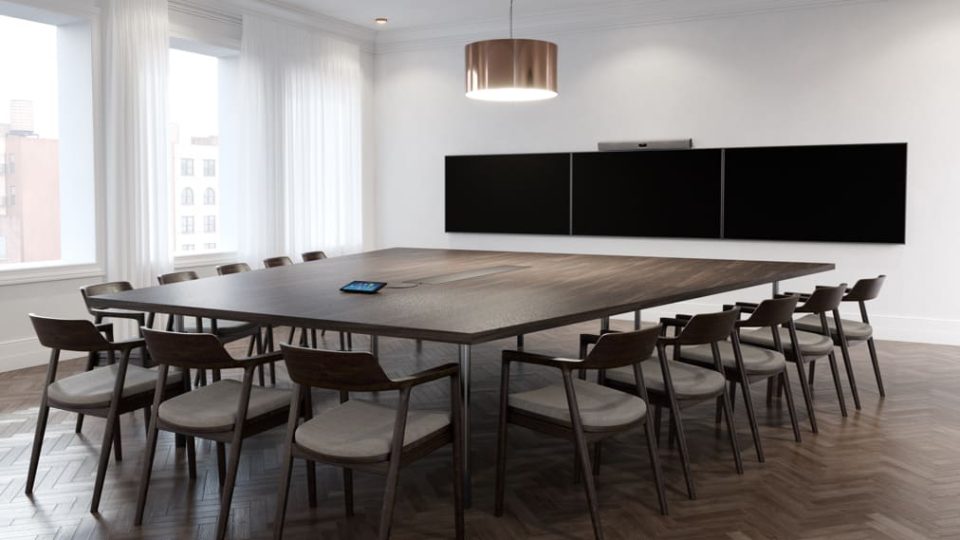
Large conference rooms remain some of the most important spaces in the modern workplace.
They’re where executive decisions are made, customer relationships are strengthened, strategic planning takes place, and cross-functional teams come together to solve complex problems. As organizations continue embracing hybrid work, these rooms must now support participants both in the room and joining remotely.
That presents a unique challenge.
The larger the meeting space, the more difficult it becomes to ensure everyone can see presentations clearly, hear every speaker, and participate naturally. Audio coverage becomes more complex, cameras need to capture larger groups, and even simple tasks like joining a meeting or sharing content can introduce unnecessary delays.
As a result, maximizing productivity in a large conference room isn’t simply about installing bigger screens or additional equipment. It’s about designing an environment where technology disappears into the background and collaboration becomes effortless.
This guide explores the key factors that make large conference rooms more productive, common challenges to avoid, and how AI-powered meeting technology is helping organizations create better hybrid meeting experiences in 2026.
Why do large conference rooms present unique challenges?
As meeting spaces grow, so does the complexity of creating a consistent experience for every participant.
Technology that performs well in a four-person huddle room may struggle in a space designed for 20 or more people.
Without careful planning, larger rooms can introduce communication barriers that reduce engagement, slow decision-making, and leave remote participants feeling disconnected from the discussion.
Audio becomes significantly more complex
Clear audio is arguably the most important factor in any meeting.
In larger conference rooms, voices need to be captured consistently across greater distances while minimizing background noise, echoes, and competing conversations.
If participants have to repeat themselves or remote attendees struggle to hear discussions, productivity quickly suffers.
Effective audio coverage requires more than louder speakers—it depends on intelligent microphone placement, echo cancellation, and adaptive audio processing that responds to the room environment.
Camera coverage matters more than ever
Remote participants should be able to see people—not just the meeting room.
Fixed cameras often struggle to provide an engaging experience in larger spaces.
Participants seated further from the camera can appear small or indistinct, making it difficult for remote colleagues to read facial expressions or follow conversations naturally.
Modern conference rooms increasingly rely on intelligent camera technologies that automatically frame participants and adapt as conversations move around the room.
Content must be visible to everyone
Whether presenting financial reports, product designs, or strategic plans, content should be equally accessible to participants regardless of where they’re located.
Poor display placement, unreadable presentations, or complicated content-sharing processes can interrupt meeting flow and reduce collaboration.
Large conference rooms benefit from displays that are appropriately sized for the space and content-sharing solutions that work reliably with minimal setup.
Hybrid meetings require meeting equity
The goal isn’t simply connecting remote participants—it’s ensuring they can contribute as naturally as everyone else.
In many organizations, hybrid meetings still favor those physically present in the room.
Remote attendees may struggle to hear side conversations, see everyone around the table, or participate in spontaneous discussions.
Creating meeting equity means designing rooms where every participant has an equal opportunity to contribute, regardless of location.
More technology can create more friction
Adding additional cameras, microphones, displays, and control panels doesn’t automatically improve meetings.
In fact, overly complex conference rooms often result in:
- Delayed meeting starts
- Confusion over which controls to use
- Technical support requests
- Inconsistent user experiences
The most productive conference rooms simplify the user experience rather than increasing complexity.
What makes a productive large conference room?
The most successful conference rooms balance technology, room design, and user experience to support natural collaboration.
Rather than focusing on individual devices, organizations should consider how every component works together to create a seamless meeting experience.
High-quality audio throughout the room
Audio quality influences every conversation.
Participants should be able to speak naturally from anywhere in the room without worrying about microphone placement or raising their voices.
Look for solutions that provide:
- Intelligent microphone coverage
- Echo cancellation
- Noise suppression
- Voice enhancement
- Consistent audio pickup across the room
When audio works well, meetings feel more conversational and require less effort from participants.
Intelligent camera systems
Modern meeting rooms benefit from cameras that adapt automatically rather than remaining fixed.
AI-powered camera technologies can:
- Automatically frame participants
- Follow active speakers
- Keep everyone visible
- Adjust as people move around the room
- Create a more engaging experience for remote attendees
This helps hybrid meetings feel more inclusive while reducing the need for manual camera adjustments.
Reliable content sharing
Presenting information should be simple.
Whether participants are sharing wireframes, spreadsheets, presentations, or videos, content sharing should happen quickly without requiring adapters, complicated setup, or multiple cables.
Wireless sharing and intuitive meeting controls help reduce interruptions while keeping meetings focused on collaboration.
Simple meeting controls
Technology should reduce friction—not create it.
Participants shouldn’t need extensive training to start a meeting or share content.
Instead, productive conference rooms emphasize:
- One-touch meeting joins
- Clear user interfaces
- Consistent room experiences
- Minimal setup time
When meeting technology is intuitive, organizations spend less time troubleshooting and more time collaborating.
Flexible room layouts
Today’s conference rooms often support a wide variety of meeting types.
The same space may host:
- Executive meetings
- Customer presentations
- Workshops
- Team planning sessions
- Training events
- Hybrid town halls
Flexible furniture layouts, movable displays, and adaptable collaboration technology help organizations get more value from every meeting space.
Best practices for maximizing conference room productivity
Creating productive conference rooms is about designing experiences—not simply installing technology.
The following best practices can help organizations improve collaboration while reducing the friction that often affects large hybrid meetings.
Design around collaboration, not equipment
It’s tempting to begin by selecting displays, cameras, and speakers.
However, productive conference rooms start with a different question:
How will people actually use this space?
Consider:
- Typical meeting sizes.
- Whether participants are primarily hybrid or fully in-person.
- How often content is shared.
- Whether workshops and whiteboarding take place.
- The level of interaction expected between remote and in-room participants.
Once these questions are answered, it’s much easier to choose technology that supports collaboration instead of dictating it.
Reduce meeting friction
Every minute spent troubleshooting technology is a minute lost from productive collaboration.
Employees increasingly expect meeting rooms to work as simply as their personal devices.
Reducing friction means minimizing the number of steps required to start and manage meetings.
This includes:
- One-touch meeting join.
- Wireless content sharing.
- Automatic device detection.
- Minimal cable requirements.
- Consistent user experiences across every meeting room.
When technology becomes almost invisible, teams can focus entirely on the discussion rather than the equipment.
Prioritize meeting equity
Large conference rooms should create the same experience for remote participants as they do for those sitting in the room.
Meeting equity has become a defining characteristic of successful hybrid workplaces.
In larger spaces, remote attendees can easily become passive observers if they struggle to see who is speaking, hear discussions clearly, or contribute naturally.
Improving meeting equity means designing every meeting with all participants in mind.
Consider:
- Positioning cameras so everyone is visible.
- Ensuring microphones capture voices consistently across the room.
- Making presentations equally visible to remote attendees.
- Encouraging facilitators to actively involve remote participants throughout discussions.
When everyone has an equal opportunity to contribute, meetings become more engaging, collaborative, and productive.
Use AI to reduce meeting friction
Artificial intelligence is helping conference rooms become smarter, simpler, and more responsive to the people using them.
Modern meeting spaces increasingly rely on AI to improve collaboration without requiring additional effort from users.
Examples include:
- Intelligent participant framing.
- Speaker tracking.
- Automatic camera adjustments.
- AI-generated meeting summaries.
- Intelligent audio processing.
- Occupancy insights and room analytics.
Rather than replacing people, AI supports better collaboration by reducing manual tasks and allowing participants to focus on the conversation.
Train less, simplify more
Technology shouldn’t require a user manual.
One of the biggest changes in workplace technology over the past few years has been a shift away from extensive user training toward intuitive meeting experiences.
The most productive conference rooms are designed so that anyone can:
- Walk into the room.
- Join a meeting.
- Share content.
- Collaborate immediately.
Reducing complexity also lowers support costs while improving user confidence and technology adoption.
Measure meeting room success
You can’t improve what you don’t measure.
Organizations increasingly use workplace analytics to understand how meeting rooms are performing and where improvements can be made.
Useful metrics include:
- Room utilization.
- Meeting start times.
- Technical support requests.
- Average meeting duration.
- Equipment reliability.
- User satisfaction.
- Environmental conditions.
These insights help workplace teams optimize room design, improve technology investments, and create better employee experiences over time.
Large conference room productivity checklist
The most effective conference rooms combine thoughtful design with intelligent technology.
Use the following checklist when planning or evaluating larger meeting spaces.
| Area | Best practice |
| Audio | Consistent microphone coverage throughout the room |
| Video | AI-powered participant framing and speaker tracking |
| Displays | Screens large enough for everyone to view content comfortably |
| Meeting controls | One-touch meeting join and intuitive interfaces |
| Content sharing | Fast, wireless sharing with minimal setup |
| Room layout | Clear sightlines for both in-room and remote participants |
| Management | Remote monitoring, analytics, and device management |
| User experience | Simple, consistent workflows across every room |
Common mistakes to avoid
Many conference rooms become less productive because technology adds complexity instead of removing it.
Avoid these common mistakes.
Using technology designed for smaller rooms
Solutions built for huddle spaces rarely provide sufficient camera coverage, audio pickup, or participant visibility in larger conference rooms.
Choose technology that matches the size and purpose of the space.
Ignoring remote participants
Hybrid meetings should never become conversations between the people sitting in the room.
Meeting leaders should actively involve remote attendees throughout discussions rather than only asking for input at the end.
Overcomplicating the room
Adding multiple control panels, complicated Audio Visual (AV) systems, and numerous cables often creates confusion rather than improving collaboration.
Simplicity should always be a design priority.
Poor camera positioning
Even the best cameras perform poorly if they’re positioned incorrectly.
Consider camera placement carefully to ensure participants remain clearly visible throughout the meeting.
Failing to measure room performance
Conference rooms should evolve alongside workplace needs.
Using room analytics helps organizations understand what’s working and identify opportunities for continuous improvement.
Trends shaping large conference rooms in 2026
Large meeting spaces are becoming more intelligent, flexible, and data-driven.
Several trends are influencing conference room design.
AI-powered meeting experiences
AI is helping automate routine meeting tasks while improving participant experiences through intelligent framing, audio optimization, meeting summaries, and collaboration assistance.
Workplace analytics
Organizations are increasingly using room usage data to understand how spaces are being used, improve workplace planning, and make more informed technology investments.
Occupancy intelligence
Smart meeting rooms can now provide insights into room occupancy, environmental conditions, and utilization trends, helping facilities teams optimize office space more effectively.
Flexible collaboration spaces
Rather than assigning rooms to specific purposes, organizations are creating adaptable spaces capable of supporting executive meetings, workshops, presentations, training sessions, and hybrid collaboration.
Meeting equity by design
The focus is shifting away from simply connecting remote participants toward creating experiences where everyone can contribute equally regardless of location.
Where Neat fits in
Creating productive large conference rooms requires more than powerful hardware—it requires technology that makes hybrid collaboration feel natural.
Neat designs meeting experiences that remove friction and help every participant stay engaged, whether they’re sitting in the room or joining remotely.
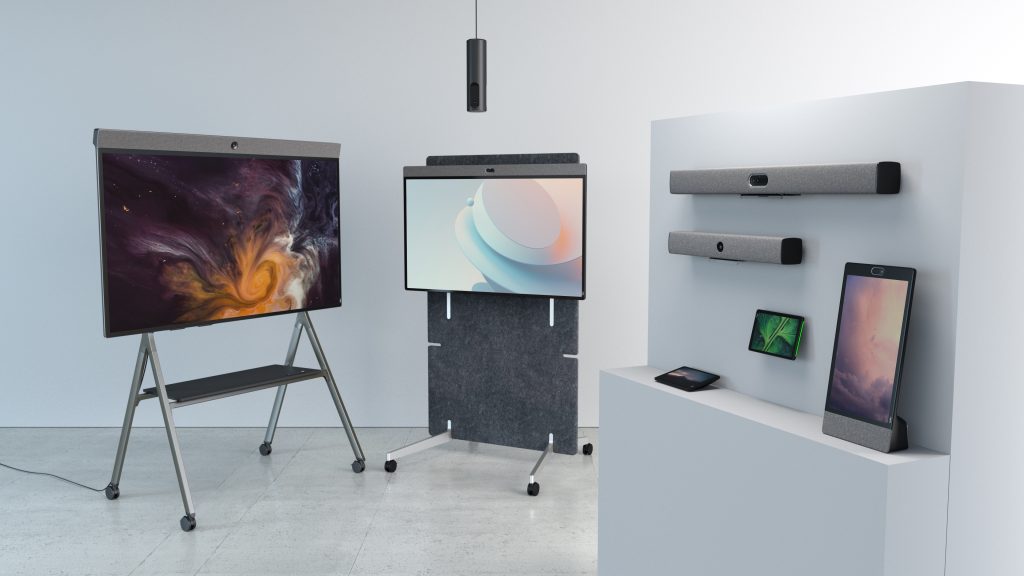
For larger meeting spaces, Neat Bar Generation 2 combines intelligent cameras, adaptive microphone arrays, premium speakers, and AI-powered processing to deliver exceptional audio and video across larger collaboration environments. Features such as Neat Symmetry dynamically frame participants, helping remote attendees see people more clearly and creating greater meeting equity throughout the discussion.
To extend visibility beyond the front of the room, Neat Center works alongside compatible Neat devices to capture conversations from every angle. By bringing remote participants closer to in-room interactions, it helps ensure everyone feels included, regardless of where they’re seated.
For interactive collaboration, Neat Board Pro provides a large-format touchscreen that combines video conferencing, wireless content sharing, digital whiteboarding, and collaborative annotation into a single device. It’s designed for larger meeting spaces where teams need to present, brainstorm, and work together visually.
Behind the scenes, Neat Experiences continuously optimize framing, audio, and video using proprietary AI-powered technologies. Rather than requiring users to adjust cameras or microphones during meetings, these intelligent capabilities work automatically, allowing teams to focus on collaboration instead of technology.
Organizations can also benefit from Neat Sense, which provides valuable environmental and occupancy insights, including room usage, air quality, temperature, humidity, and CO₂ levels. These insights help workplace teams better understand how meeting spaces are being used while supporting healthier and more efficient office environments.
Managing large deployments is equally straightforward with Neat Pulse, a cloud-based management platform that enables IT teams to monitor devices, deploy software updates, and maintain meeting room performance remotely across multiple locations.
Finally, Neat Open gives organizations the flexibility to use the collaboration platforms that best fit their business, allowing meeting spaces to evolve alongside changing workplace requirements rather than being tied to a single ecosystem.
Together, these capabilities help organizations create conference rooms that are easier to manage, more engaging to use, and better equipped for the future of hybrid work.
Perhaps it’s time to book a demo and experience them for yourself.
Frequently asked questions
How do you maximize productivity in a large conference room?
Start by designing the room around collaboration rather than technology. Prioritize high-quality audio, intelligent cameras, simple meeting controls, reliable content sharing, and meeting equity so both remote and in-room participants can contribute effectively.
What technology should a large conference room have?
Most large conference rooms benefit from AI-powered cameras, adaptive microphone arrays, premium speakers, wireless content sharing, intuitive meeting controls, and centralized device management.
Why do large hybrid meetings often feel less productive?
Large meetings can suffer from poor audio coverage, limited participant visibility, complicated technology, and reduced engagement from remote attendees. Designing the room specifically for hybrid collaboration helps overcome these challenges.
How many people should a large conference room support?
The ideal capacity depends on your organization’s needs, but the room should be designed so every participant can clearly see presentations, hear discussions, and contribute comfortably without technology becoming a barrier.
How do you improve meeting equity?
Meeting equity improves when remote participants have the same ability to see, hear, and participate as those physically present. Intelligent cameras, high-quality audio, and inclusive meeting practices all contribute to a more balanced experience.
Can AI improve conference room productivity?
Yes. AI can automate participant framing, optimize audio, generate meeting summaries, provide occupancy insights, and reduce meeting friction, allowing teams to focus more on collaboration.
How do you measure conference room productivity?
Organizations commonly measure room utilization, meeting start times, technical issues, environmental conditions, user satisfaction, and room occupancy to understand how effectively conference spaces are being used.
What’s the difference between a conference room and a boardroom?
A boardroom is typically designed for executive meetings and formal decision-making, while a conference room supports a broader range of collaborative activities, including workshops, customer meetings, presentations, training sessions, and hybrid team meetings.
Sources
- Work Trend Index Annual Report, Microsoft, https://www.microsoft.com/worklab/work-trend-index
- Global Workplace Survey, Gensler Research Institute, https://www.gensler.com/gri
- The Future of Work After COVID-19, McKinsey & Company, https://www.mckinsey.com/capabilities/people-and-organizational-performance/our-insights/the-future-of-work-after-covid-19





