


How to Improve Webcam Quality in 2026: A Practical Guide for Better Video Meetings
Hayley Spooner, Jun 2, 2026
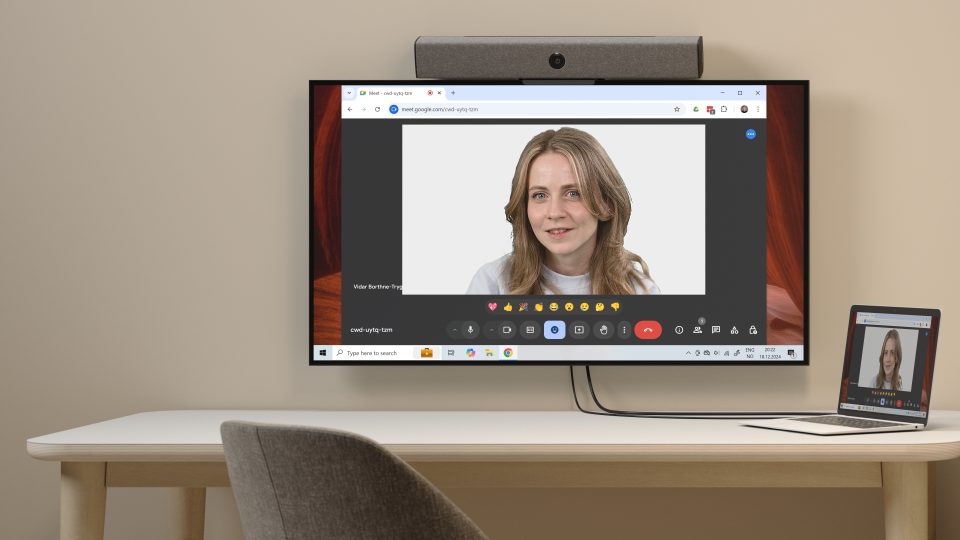
Key takeaways
- Lighting remains the single most important factor affecting webcam quality.
- Camera positioning has a major impact on professionalism and engagement.
- A clean background helps maintain focus during meetings.
- AI-powered video enhancements can significantly improve image quality.
- Stable internet connectivity is essential for smooth video performance.
- External webcams and dedicated video devices often outperform built-in laptop cameras.
- Consistent setups improve the meeting experience across teams and organizations.
- Modern collaboration devices can deliver a more complete solution than webcams alone.
Video communication is now one of the most important ways people work, collaborate, and build relationships. Whether you’re speaking with customers, interviewing candidates, managing distributed teams, or participating in a company-wide meeting, the quality of your video directly affects how effectively you communicate.
In 2026, expectations for video quality are higher than ever. Hybrid work has become a permanent part of business operations, AI-powered video technology is widely available, and participants expect clear, professional meeting experiences regardless of location.
The good news is that improving webcam quality doesn’t require expensive equipment or a complicated setup. In most cases, a few targeted improvements can dramatically enhance how you appear on camera.
This guide explains how to improve webcam quality, which factors have the greatest impact, and how organizations can create consistent video experiences across home offices, meeting rooms, and hybrid workplaces.
Quick answer: How to improve webcam quality
If you want to improve webcam quality quickly:
- Use front-facing lighting.
- Position your camera at eye level.
- Keep your background clean and uncluttered.
- Enable HD video settings.
- Use a stable internet connection.
- Clean your camera lens.
- Enable AI-powered video enhancements if available.
- Upgrade to an external webcam or dedicated video device if necessary.
These changes typically provide the biggest improvements with the least effort.
What does good webcam quality mean?
Many people assume webcam quality is determined solely by resolution. While resolution matters, it is only one part of the equation.
A high-quality video feed combines several factors:
- Clear facial visibility
- Accurate colors
- Balanced lighting
- Consistent exposure
- Smooth movement
- Minimal image noise
- Stable network performance
A 1080p webcam in a well-lit room often produces better results than a 4K camera in poor lighting conditions.
The goal is not simply sharper video. The goal is to create an experience where participants can focus on the conversation rather than the technology.
| Element | Why it matters | Impact on video quality |
|---|---|---|
| Lighting | Determines visibility and detail | Very high |
| Camera positioning | Affects professionalism and engagement | High |
| Camera sensor | Captures light and image detail | High |
| Network connection | Influences video stability | High |
| Audio quality | Affects overall meeting experience | Medium |
| AI enhancements | Improves framing and exposure | Medium |
| Resolution | Controls image sharpness | Medium |
The factors that affect webcam quality
Several elements work together to determine overall video quality.
Lighting
Lighting affects visibility, detail, contrast, and color accuracy.
Camera quality
Sensors, lenses, autofocus systems, and image processing influence how effectively a camera captures your image.
Positioning
Camera angle affects perception, engagement, and professionalism.
Network performance
Bandwidth, latency, and packet loss directly impact video quality.
Software optimization
Modern platforms use AI to improve image quality and meeting experiences.
Understanding these factors helps identify where improvements will have the greatest impact.
Start with lighting
If you can improve only one thing, improve your lighting. Lighting remains the most important factor influencing webcam quality.
Even premium cameras struggle in poorly lit environments. Conversely, modest webcams can produce excellent results when lighting is properly managed.
The ideal setup places a soft light source directly in front of you. Natural daylight often delivers the best results. Sitting facing a window allows light to illuminate your face evenly while creating a natural appearance.
When natural light is unavailable, diffused Light-Emitting Diode (LED) lighting can provide similar results.
Lighting best practices
Recommended:
- Face a window during daytime meetings
- Use soft LED desk or key lights
- Distribute lighting evenly across your face
Avoid:
- Bright windows behind you
- Strong overhead lighting without front lighting
- Dark rooms
- Mixed lighting temperatures
Good lighting improves:
- Sharpness
- Color accuracy
- Eye contact visibility
- Professional appearance
More than any hardware upgrade, lighting delivers the fastest return on investment.
| Lighting setup | Result | Recommendation |
|---|---|---|
| Natural light in front | Clear, natural image | Ideal |
| Soft LED key light | Consistent quality | Highly recommended |
| Overhead light only | Shadows on face | Acceptable with additional lighting |
| Bright window behind | Silhouette effect | Avoid |
| Low-light room | Grainy video | Avoid |
Position the camera correctly
Place your camera at eye level. Camera placement influences how people perceive you.
When cameras are positioned too low, they create an unflattering perspective. When positioned too high, they can feel unnatural and disconnected. The best setup places the camera lens at eye level and directly in front of you.
For ideal framing:
- Include your head and shoulders
- Leave a small amount of space above your head
- Center yourself in the frame
- Maintain a comfortable distance from the camera
Eye-level positioning creates a natural viewing angle and helps simulate face-to-face communication.
Optimize your background
Backgrounds influence how professional and focused you appear. A clean environment keeps attention on the speaker and reduces distractions.
The most effective backgrounds are often the simplest:
- Neutral walls
- Organized home offices
- Tasteful shelving
- Subtle company branding
Background blur is generally preferable to virtual backgrounds because it preserves image quality and creates a more natural appearance.
Virtual backgrounds remain useful in some situations but can introduce visual artifacts and edge distortions.
Use the right camera
Laptop webcams have improved substantially in recent years. However, external webcams and dedicated collaboration devices still offer meaningful advantages.
Benefits include:
- Larger image sensors
- Better low-light performance
- Faster autofocus
- Wider dynamic range
- More accurate colors
- Better image processing
For professionals who spend significant time on video calls, upgrading camera hardware can provide noticeable improvements.
That said, hardware upgrades should come after improvements to lighting and positioning.
| Device type | Image quality | Best for |
|---|---|---|
| Built-in laptop webcam | Basic to moderate | Occasional meetings |
| External webcam | Good to very good | Daily professional use |
| Dedicated video device | High | Hybrid workers and executives |
| Meeting room collaboration device | Premium | Team collaboration spaces |
Leverage AI video enhancements
One of the biggest developments in video collaboration is the widespread adoption of AI-powered video technology.
Modern conferencing platforms and devices increasingly include features such as:
- Automatic framing
- Speaker tracking
- Intelligent zoom
- Eye contact correction
- Portrait lighting optimization
- Background noise reduction
- Exposure adjustment
These tools help create more engaging and professional video experiences.
AI enhancements are now widely available across major collaboration platforms including Microsoft Teams, Zoom Workplace, and Google Meet, as well as modern video collaboration devices.
While AI cannot compensate for poor fundamentals, it can significantly improve an already strong setup.
Ensure a stable network connection
Video quality depends as much on network performance as camera quality. Even perfect lighting and premium cameras cannot overcome poor connectivity. Whenever possible:
- Use wired Ethernet
- Minimize network congestion
- Stay close to Wi-Fi access points
- Limit bandwidth-intensive activities during meetings
Important factors include:
Bandwidth
Insufficient bandwidth can reduce video quality.
Latency
High latency creates delays in conversation.
Packet loss
Packet loss causes freezes, glitches, and interruptions.
For professional meetings, a stable connection is typically more important than extremely high internet speeds.
Improve audio to support video quality
Although this guide focuses on webcam quality, audio quality significantly affects how meetings are perceived. Participants are generally more tolerant of imperfect video than poor audio.
Improving audio quality can:
- Reduce fatigue
- Improve understanding
- Increase engagement
- Create a more professional impression
Consider using:
- USB microphones
- Wireless headsets
- Conferencing speakerphones
- Dedicated room audio systems
Video and audio should be viewed as complementary parts of the same communication experience.
Create a consistent setup
Consistency is often overlooked.
Many professionals continually adjust their setup between meetings, resulting in inconsistent quality. Instead, establish a repeatable environment.
Maintain consistency in:
- Lighting
- Camera placement
- Background
- Audio equipment
- Network conditions
Organizations that standardize video environments often deliver more professional and predictable meeting experiences.
Common mistakes that reduce webcam quality
Many webcam problems stem from simple setup issues.
Backlighting
Bright windows behind you make faces difficult to see.
Low camera angles
Cameras positioned below eye level create unflattering perspectives.
Poor lighting
Insufficient light increases image noise and reduces detail.
Cluttered backgrounds
Busy environments distract meeting participants.
Dirty camera lenses
Smudges can noticeably reduce image clarity.
Weak Wi-Fi
Network instability can make high-quality cameras appear poor.
Addressing these issues often produces immediate improvements.
| Problem | Likely cause | Solution |
|---|---|---|
| Blurry image | Dirty lens or poor focus | Clean lens and refocus |
| Grainy video | Insufficient lighting | Improve lighting |
| Dark face | Backlighting | Move light source in front |
| Choppy video | Poor network connection | Improve connectivity |
| Distracting image | Cluttered background | Simplify background |
| Unprofessional appearance | Low camera angle | Raise camera to eye level |
Why webcam quality matters more in hybrid work
Hybrid work has fundamentally changed expectations around video communication. Meetings now regularly include participants joining from:
- Home offices
- Conference rooms
- Shared workspaces
- Mobile devices
As a result, video quality is no longer a personal preference. It is a component of professional communication. Clear video helps:
- Build trust
- Improve engagement
- Support collaboration
- Reduce misunderstandings
- Create more inclusive meetings
Organizations that invest in video quality often improve both internal collaboration and external customer interactions.
Where Neat fits in
While webcams remain important, many organizations now require complete collaboration solutions rather than standalone cameras.
As hybrid work continues to evolve, teams increasingly need consistent meeting experiences across home offices, huddle spaces, conference rooms, and large collaboration environments. Achieving this consistency can be challenging when relying on a combination of separate webcams, microphones, speakers, and displays.
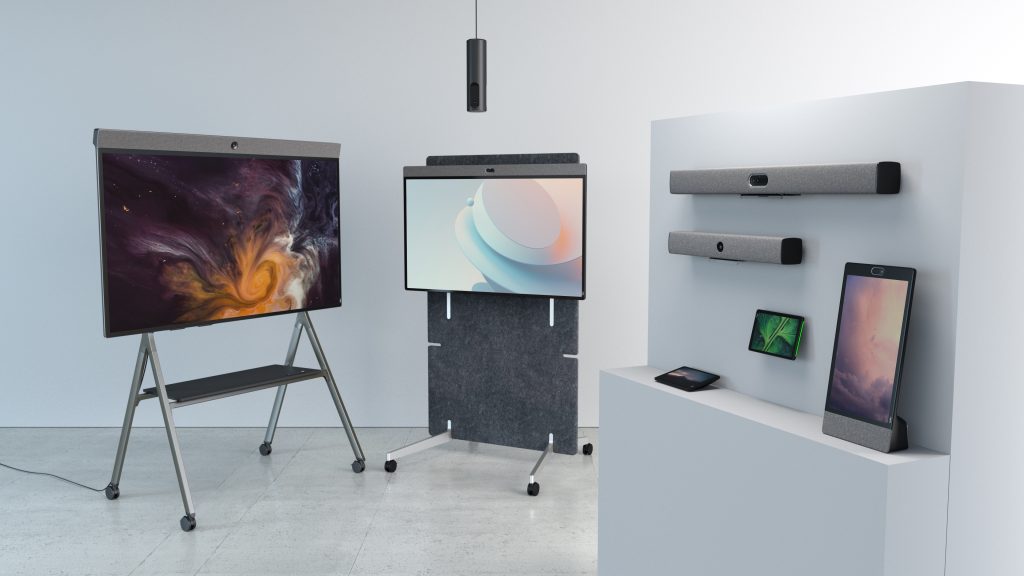
Neat devices are designed to simplify video collaboration by combining intelligent cameras, advanced audio technology, AI-powered framing, and native integration with leading collaboration platforms into a single purpose-built solution.
For organizations looking to improve meeting quality across a range of spaces, different devices are designed to meet different needs.
The Neat Board 50 combines a large multi-touch display, intelligent camera system, microphones, speakers, and collaboration tools into a single device. Designed for meeting rooms, collaborative workspaces, and hybrid teams, it helps create engaging video experiences while reducing the complexity of deploying multiple pieces of hardware. Features such as adaptive framing and intelligent audio ensure that participants remain clearly seen and heard throughout meetings.
For small and medium-sized meeting rooms, the Neat Bar Generation 2 delivers high-quality video and audio in a compact form factor. Its advanced camera system, AI-powered framing capabilities, and improved processing performance help create a more natural meeting experience for both in-room and remote participants. By automatically adjusting to meeting dynamics, it helps ensure that conversations remain inclusive and engaging.
Beyond individual products, Neat’s approach focuses on creating a consistent collaboration experience across an organization. This consistency supports many of the best practices discussed throughout this guide, including improved camera quality, better participant visibility, enhanced audio performance, and more reliable hybrid meeting experiences.
Rather than relying on multiple disconnected components, organizations can create a more streamlined and professional setup using purpose-built collaboration devices designed for modern work.
The ultimate goal is simple: make technology fade into the background so people can focus on the conversation, collaboration, and outcomes that matter most.
Book a demo or explore our range of devices today.
Frequently asked questions about webcam quality
How can I improve webcam quality quickly?
Start with lighting and camera positioning. These two changes typically create the biggest immediate improvement.
Why does my webcam look blurry?
Common causes include poor lighting, a dirty lens, low bandwidth, outdated hardware, or incorrect video settings.
Does lighting matter more than the camera?
Yes. In most situations, lighting has a greater impact on image quality than upgrading camera hardware.
Is 4K necessary for video calls?
No. For most professional meetings, 1080p provides more than enough quality.
Can AI improve webcam quality?
Yes. AI-powered features can improve framing, exposure, focus, and eye contact while reducing distractions.
Are external webcams still worth buying in 2026?
Yes. External webcams and dedicated collaboration devices often deliver superior image quality and low-light performance compared with built-in laptop cameras.
What internet speed is recommended for HD video calls?
Requirements vary by platform, but stability, low latency, and sufficient bandwidth are generally more important than maximum speed.
Why does my video look different in Teams, Zoom, and Google Meet?
Each platform applies different compression methods, image processing techniques, and AI enhancements, which can affect appearance and video quality.