


How to Choose the Best Webcam for Video Meetings in 2026: A Complete Buyer’s Guide
Hayley Spooner, Jul 21, 2026
Key takeaways
- Built-in laptop webcams have improved significantly, but they’re not the best choice for every professional.
- AI-powered features such as auto-framing and intelligent exposure often improve meeting quality more than higher resolution alone.
- Good audio is just as important as good video when choosing a webcam for meetings.
- Your ideal webcam depends on how and where you work, from home offices to shared meeting spaces.
- Compatibility, ease of use, and security should be considered alongside image quality.
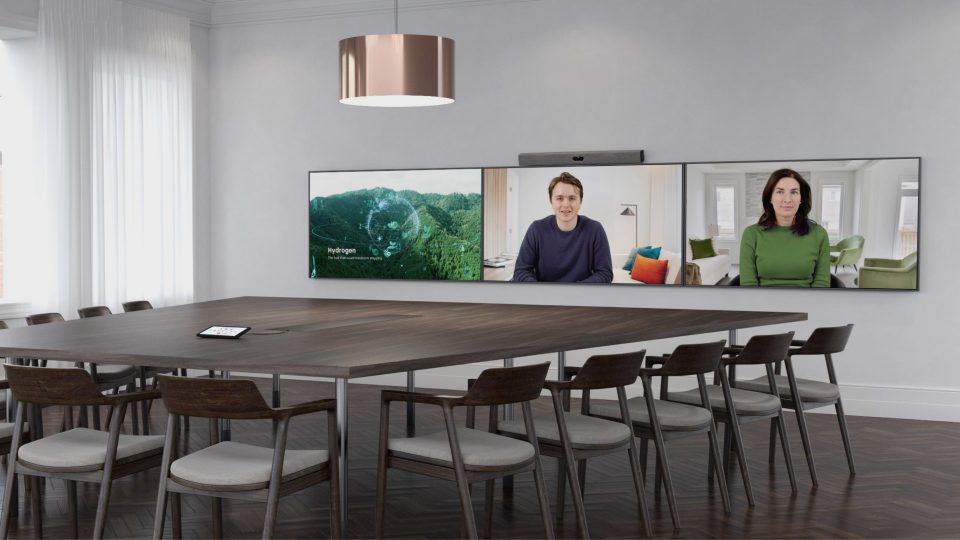
- For meeting rooms and collaborative spaces, purpose-built collaboration devices often provide a better experience than standalone webcams.
Introduction
Choosing a webcam used to be relatively simple. If you wanted better image quality than your laptop’s built-in camera, you bought an external webcam with a higher resolution and called it a day.
Today, the decision is far more nuanced.
Modern laptops often include high-quality cameras with AI-powered image enhancements, while external webcams offer increasingly intelligent features such as automatic framing, low-light optimisation, and background processing. At the same time, organisations are investing in purpose-built collaboration devices that deliver integrated video, audio, and AI capabilities for meeting rooms.
As hybrid work continues to evolve, buying a webcam is no longer just about looking better on camera. It’s about creating a meeting experience where participants can communicate naturally, remain engaged, and collaborate effectively regardless of where they’re working.
Whether you’re upgrading your home office, equipping employees, or choosing technology for customer-facing meetings, understanding which features genuinely improve collaboration will help you make a smarter investment.
This guide explains when you need an external webcam, which features matter most in 2026, and how to choose the right solution for your workspace.
Do you still need an external webcam?
Not everyone needs an external webcam, but the right camera can significantly improve meeting quality depending on your work environment.
Built-in laptop cameras have improved dramatically over the past few years. Many newer devices now include Full HD cameras, AI image enhancement, automatic exposure adjustment, and better low-light performance than previous generations.
For many professionals, that’s perfectly adequate.
However, if video meetings are a regular part of your working day—or your role depends on making a strong impression—an external webcam can still offer meaningful advantages.
When a built-in webcam is enough
A laptop camera is often sufficient if you:
- Join occasional internal meetings.
- Primarily work from different locations.
- Need a lightweight, portable setup.
- Rarely present to clients or external audiences.
- Already have a modern laptop with a high-quality camera.
For these users, upgrading lighting or microphone quality may deliver a greater improvement than purchasing a new camera.
When an external webcam makes sense
A dedicated webcam is worth considering if you:
- Spend several hours each day in video meetings.
- Frequently present to customers or stakeholders.
- Use a desktop computer without a built-in camera.
- Need consistent image quality across different lighting conditions.
- Create webinars, training sessions, or recorded presentations.
- Want greater flexibility over camera positioning.
Many external webcams also include larger image sensors, improved optics, and AI-powered features that can noticeably enhance your appearance on camera.
Which solution is right for you?
The best webcam depends on how you work, not simply on its specifications.
| You mostly… | Recommended solution |
| Join occasional internal meetings | Built-in laptop webcam |
| Work remotely most days | External webcam |
| Present to customers or clients | Premium AI-powered webcam |
| Record presentations or webinars | High-quality external webcam |
| Lead meetings from a shared space | Purpose-built collaboration device |
| Run meetings in conference rooms | Integrated collaboration system |
Rather than asking, “What’s the best webcam?”, it’s often more useful to ask:
“What’s the best camera for the way I work?”
What should you look for in a webcam?
Choosing a webcam isn’t about finding the longest feature list—it’s about selecting the features that improve real-world collaboration.
While image resolution often receives the most attention, it’s only one part of the overall meeting experience.
Here are the features that matter most in 2026.
Image resolution
Resolution is important, but it’s no longer the deciding factor it once was.
For most professionals:
- 1080p (Full HD) provides excellent quality for everyday meetings.
- 4K delivers greater detail and flexibility but only when supported by your hardware, internet connection, and conferencing platform.
Higher resolution doesn’t automatically mean better video quality.
Factors such as lighting, image processing, and lens quality often have a much greater impact on how you appear during a meeting.
Unless you’re recording content professionally or frequently presenting on large displays, a high-quality 1080p camera is often more than sufficient.
AI-powered camera features
AI is becoming one of the biggest differentiators between modern webcams. As organisations increasingly embrace AI-powered collaboration, intelligent camera features are helping create more natural and engaging meeting experiences.
Rather than simply capturing video, many cameras now analyse the meeting environment in real time to improve the participant experience.
Common AI-powered features include:
- Automatic framing
- Face detection
- Intelligent exposure adjustment
- Background optimisation
- Automatic white balance
- Subject tracking
These capabilities help ensure you remain clearly visible without manually adjusting the camera throughout the meeting.
For professionals who regularly move while presenting or collaborate from different environments, AI features often provide more practical value than higher resolution alone.
Field of view
A webcam’s field of view determines how much of the room is visible.
Choosing the right angle depends on your workspace.
| Workspace | Recommended field of view |
| Individual home office | 65–78° |
| Small shared workspace | 78–90° |
| Small meeting room | 90–120° |
| Larger collaboration spaces | AI-adjustable or wider field of view |
An overly wide field of view may capture unnecessary background distractions, while a narrow view can make meetings feel restrictive.
AI-powered framing can help maintain the right composition automatically.
Low-light performance
Good lighting remains one of the biggest contributors to image quality.
Many meetings take place in home offices, shared workspaces, or rooms with inconsistent lighting.
A webcam with a larger image sensor and intelligent exposure adjustment will generally produce a clearer, more natural image than a higher-resolution camera with poor low-light performance.
Before investing in 4K resolution, consider whether improving your lighting setup would provide a greater benefit.
Audio quality matters too
Many webcam buyers focus entirely on video quality while overlooking audio.
In reality, participants are often more tolerant of average video than poor sound.
If your voice isn’t clear, even the sharpest image won’t create a better meeting experience.
Look for features such as:
- Noise suppression
- Echo cancellation
- Beamforming microphones
- Voice enhancement
If your webcam doesn’t include high-quality microphones, consider pairing it with a dedicated headset or external microphone.
Privacy and security
As organisations place greater emphasis on cybersecurity and data protection, privacy features have become increasingly important.
When evaluating webcams, consider:
- Physical privacy shutters.
- Firmware update support.
- Manufacturer security policies.
- Enterprise device management capabilities.
- USB security and authentication features where applicable.
These considerations are particularly important for organisations deploying webcams at scale.
Platform compatibility
Before purchasing a webcam, ensure it works seamlessly with your preferred collaboration platforms.
Most modern webcams support:
- Microsoft Teams
- Zoom Workplace
- Google Meet
- Cisco Webex
- BYOD (Bring Your Own Device) meeting environments
It’s also worth checking compatibility with your operating system and available ports, particularly if you’re using USB-C devices or docking stations.
The easier a webcam is to deploy and manage, the more likely it is to provide a consistent experience across your organisation.
External webcam vs. collaboration device
An external webcam improves individual video quality, but it isn’t always the best solution for collaborative work.
Many professionals assume that buying a better webcam will solve every meeting challenge. While an external webcam can significantly improve the experience for individual users, it doesn’t address the broader needs of shared meeting spaces.
Conference rooms require more than a camera. They need high-quality audio, intelligent framing, speaker tracking, content sharing, and a consistent experience for everyone in the room.
That’s why many organisations are moving beyond standalone webcams and investing in purpose-built collaboration devices.
| External webcam | Collaboration device |
| Designed for one person | Designed for shared meeting spaces |
| Improves personal video quality | Creates a complete meeting experience |
| Limited microphone coverage | Intelligent microphone arrays |
| Fixed or manually adjusted framing | AI-powered auto-framing and speaker tracking |
| Uses laptop speakers and microphones | Integrated premium audio and video |
| Best for desks and home offices | Best for huddle rooms, meeting rooms, and collaboration spaces |
For individual professionals, an external webcam remains an excellent investment.
For organisations looking to improve collaboration across teams, however, a dedicated collaboration device often delivers a more consistent and scalable solution.
Common webcam buying mistakes
Choosing the wrong webcam often comes down to focusing on specifications rather than the overall meeting experience.
Here are some of the most common mistakes to avoid.
Buying 4K when lighting is poor
Higher resolution won’t compensate for poor lighting.
A well-lit 1080p camera often produces a better image than a 4K webcam in a dim room.
If your workspace lacks natural light, improving your lighting setup may have a greater impact than upgrading your camera.
Ignoring microphone quality
People often judge meeting quality more by what they hear than what they see.
If participants struggle to understand your voice because of background noise or poor microphone performance, even the sharpest video won’t improve communication.
Choosing features you’ll never use
It’s easy to be drawn to long feature lists, but not every capability is essential.
Instead, prioritise features that match the way you work.
For example:
- Remote workers may benefit most from AI framing and noise suppression.
- Customer-facing professionals may prioritise image quality and eye contact.
- Hybrid teams may need better collaboration rather than a better camera.
Forgetting compatibility
Before buying a webcam, confirm it works with your preferred collaboration platforms, operating system, docking station, and available ports.
A simple plug-and-play experience often provides more long-term value than additional technical features.
Buying consumer webcams for meeting rooms
Consumer webcams are designed for individuals.
Meeting rooms have completely different requirements, including:
- Wider camera coverage
- Multiple participants
- Better microphone pickup
- Echo cancellation
- Intelligent framing
- High-quality speakers
Using the wrong type of device often results in poor experiences for both in-room and remote participants.
Webcam trends shaping video meetings in 2026
The future of webcams is being driven less by hardware specifications and more by intelligent software.
Several trends are changing how organisations evaluate video technology.
AI-powered cameras
AI is becoming a standard feature rather than a premium upgrade.
Modern cameras increasingly use AI to:
- Automatically frame participants.
- Optimise exposure.
- Improve colour balance.
- Detect faces.
- Maintain focus during movement.
These features help create more natural and professional video experiences with minimal user intervention.
Eye contact correction
New AI technologies can subtly adjust gaze to make it appear as though participants are looking directly at the camera, creating more engaging conversations without changing natural behaviour.
As these technologies mature, eye contact correction is likely to become increasingly common in professional collaboration tools.
Better audio integration
The distinction between cameras and audio devices continues to blur.
Rather than relying on separate peripherals, many organisations now prefer integrated systems that combine cameras, microphones, speakers, and AI-powered audio processing into a single solution.
This simplifies deployment while delivering a more consistent meeting experience.
Meeting equity
Organisations are placing greater emphasis on ensuring everyone has an equal opportunity to participate, regardless of where they’re joining from.
Rather than simply improving image quality, camera technology is increasingly designed to help remote participants feel like active contributors instead of passive observers.
Smarter collaboration devices
As AI capabilities continue to evolve, the industry is shifting from standalone webcams towards intelligent collaboration systems that optimise the entire meeting experience.
Instead of requiring users to manage multiple devices, these integrated solutions automatically adapt to changing meeting environments and participant behaviour.
Where Neat fits in
The best meeting experience isn’t created by a better webcam alone—it’s created by technology that helps people collaborate naturally.
For many professionals, a high-quality webcam is the right solution for improving personal video meetings.
As organisations grow, however, meeting spaces become more complex. Conversations involve multiple participants, hybrid teams, shared workspaces, and a growing expectation that every attendee can contribute equally.
This is where purpose-built collaboration devices provide advantages that standalone webcams cannot.
Neat designs integrated solutions that combine intelligent cameras, premium microphones, high-quality speakers, and AI-powered processing into a seamless meeting experience.
For personal workspaces and smaller collaboration spaces, intelligent camera technologies help ensure participants remain naturally framed and clearly visible throughout the meeting.
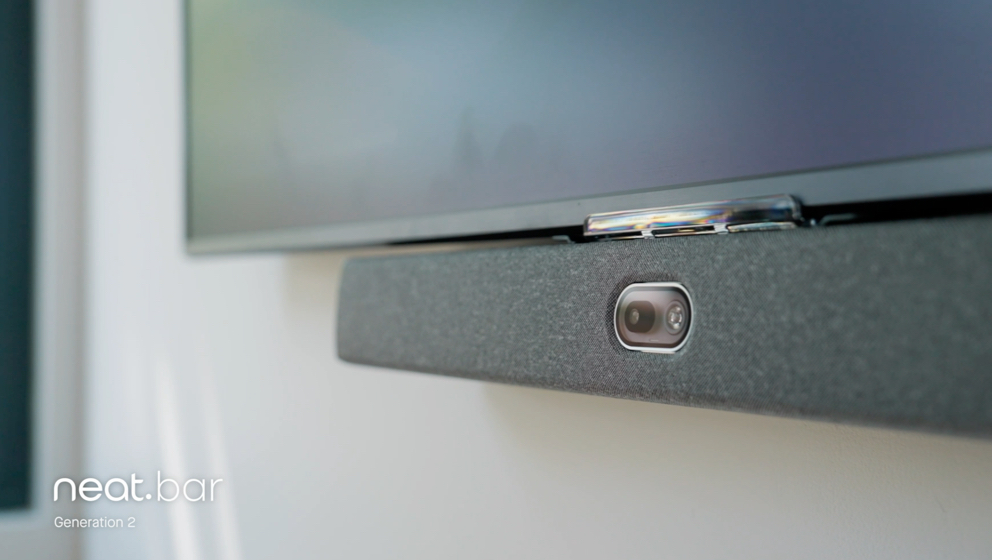
For larger meeting rooms, devices such as Neat Bar Generation 2 provide adaptive video, advanced microphone arrays, and premium audio designed specifically for hybrid collaboration.
For interactive meeting spaces, Neat Board 50 combines video conferencing, wireless content sharing, digital whiteboarding, and an immersive touch display in a single device, reducing complexity while improving collaboration.
Supporting every device are Neat Experiences, a collection of intelligent technologies that continuously optimise audio, video, participant framing, and meeting equity. Rather than asking users to adjust cameras throughout a meeting, these capabilities work automatically in the background to create more natural conversations.
For organisations using multiple collaboration platforms, Neat Open provides the flexibility to choose the meeting applications that best fit their workflows while maintaining a consistent collaboration experience across different spaces.
Whether you’re equipping a home office, upgrading meeting rooms, or supporting a hybrid workforce, the goal isn’t simply to improve image quality—it’s to help every participant communicate more effectively.
Perhaps it’s time to book a demo and experience them for yourself.
Frequently asked questions
Do I still need an external webcam in 2026?
Not necessarily. Many modern laptops include excellent built-in cameras that are suitable for everyday meetings. However, if you regularly present to customers, spend several hours a day on video calls, or use a desktop computer, an external webcam can still provide noticeable improvements in image quality and flexibility.
Is a 4K webcam worth it?
For many professionals, a high-quality 1080p webcam is sufficient. Better lighting, improved optics, and AI-powered image processing often have a greater impact on meeting quality than higher resolution alone.
What’s more important: camera quality or microphone quality?
Both matter, but poor audio is often more disruptive than average video. Clear speech helps participants stay engaged, while poor microphone performance can make meetings difficult to follow regardless of image quality.
Do AI webcams improve video meetings?
Yes. Features such as auto-framing, intelligent exposure, face detection, and subject tracking help create a more natural meeting experience without requiring manual camera adjustments.
Can I use an external webcam in a meeting room?
You can, but it’s rarely the ideal solution. Meeting rooms typically require wider camera coverage, better microphones, integrated speakers, and intelligent framing designed for multiple participants.
What’s the difference between a webcam and a collaboration device?
A webcam is designed to improve video for an individual user, while a collaboration device combines cameras, microphones, speakers, and AI-powered technologies to create a complete meeting experience for shared spaces.
Which webcam works best with Microsoft Teams or Zoom?
Most modern webcams support Microsoft Teams, Zoom Workplace, Google Meet, and other major collaboration platforms. Before purchasing, always verify compatibility with your operating system and preferred meeting applications.
What features should I prioritise when buying a webcam?
Focus on the features that improve your everyday experience, including image quality, low-light performance, AI-powered framing, microphone quality, platform compatibility, and ease of use rather than resolution alone.
Sources
- Work Trend Index Annual Report, Microsoft, https://www.microsoft.com/en-us/worklab/work-trend-index
- Global Workplace Survey, Gensler Research Institute, https://www.gensler.com/gri
- The State of Hybrid Work, Steelcase, https://www.steelcase.com/research/
- The Future of Work After COVID-19, McKinsey & Company, https://www.mckinsey.com/capabilities/people-and-organizational-performance/our-insights/the-future-of-work-after-covid-19





