


8 Video Conferencing Business Benefits and Advantages
Hayley Spooner, Jun 22, 2026

Key takeaways
- Video conferencing is now essential business infrastructure for hybrid work and distributed collaboration.
- The biggest benefits include improved communication, lower travel costs, faster decision-making, and greater workplace flexibility.
- AI-powered features like transcription, summaries, and intelligent framing are reshaping modern meetings.
- Strong video collaboration supports employee experience, customer engagement, and global teamwork.
- Organizations increasingly prioritize simple, standardized conferencing systems that are easy to scale and manage.
Quick answer: What are the biggest business benefits of video conferencing?
The biggest business benefits of video conferencing include improved communication, lower travel costs, stronger hybrid work support, increased productivity, and greater workplace flexibility.
In 2026, video conferencing also plays a major role in supporting AI-powered collaboration, distributed teamwork, customer engagement, and global business operations. For many organizations, it has become one of the most important tools supporting modern work.
Why video conferencing matters more in 2026
Video conferencing has evolved far beyond simple online meetings. It is now a foundational part of how businesses communicate internally, collaborate across locations, and interact with customers and partners.
Hybrid work has permanently changed workplace expectations. Employees increasingly expect flexible collaboration experiences that allow them to work effectively from offices, homes, coworking spaces, and while traveling. At the same time, organizations are redesigning offices around collaboration rather than individual desk work.
That shift has increased demand for:
- Better meeting room technology
- More inclusive hybrid meetings
- AI-powered collaboration
- Simplified conference room experiences
- Standardized conferencing systems
Modern video conferencing platforms now support intelligent framing, live captions, AI-generated summaries, real-time transcription, wireless collaboration, and interactive whiteboarding. As these capabilities continue evolving, video conferencing is becoming less about replacing face-to-face interaction and more about enabling continuous collaboration regardless of location.
1. Improved communication across distributed teams
One of the biggest advantages of video conferencing is the ability to maintain strong communication across distributed teams.
Organizations increasingly operate across multiple offices, remote environments, hybrid workplaces, and international locations. Without video collaboration, communication can quickly become fragmented and inefficient.
Video conferencing helps create more natural conversations by allowing employees to see facial expressions, body language, visual presentations, and real-time reactions that are often lost through email or messaging alone. For distributed organizations, video meetings also help strengthen team alignment and improve collaboration speed.
How video conferencing improves communication
| Benefit | Impact |
| Face-to-face interaction | More natural communication |
| Faster discussions | Quicker alignment |
| Visual collaboration | Better understanding |
| Real-time feedback | Faster decision-making |
| Cross-location meetings | Stronger distributed teamwork |
In 2026, many organizations now view video collaboration as essential to maintaining workplace culture across distributed environments.
2. Reduced travel costs and time
Travel reduction remains one of the most immediate business benefits of video conferencing.
Organizations can now conduct customer meetings, project planning sessions, training, hiring interviews, and executive reviews without requiring employees to travel constantly between offices or client locations.
This reduces travel expenses, hotel costs, commuting time, and scheduling delays while also helping organizations lower their environmental impact. At the same time, teams can often make decisions faster because meetings can happen immediately rather than waiting for travel schedules to align.
For global organizations, this flexibility significantly improves operational efficiency and allows employees to spend more time on productive work rather than logistics.
3. Better support for hybrid work
Video conferencing has become one of the foundations of hybrid work.
Without reliable video collaboration, hybrid workplaces quickly create unequal experiences between remote and in-office employees. Poor meeting quality can reduce participation, collaboration, and engagement.
Modern conferencing systems help organizations create more inclusive meeting experiences through:
- Better audio quality
- AI-powered camera framing
- Intelligent speaker tracking
- Real-time captions
- Interactive collaboration tools
The goal is no longer simply connecting people to meetings. It is ensuring all participants can contribute equally regardless of location.
Why video conferencing matters for hybrid work
| Hybrid challenge | How conferencing helps |
| Distributed employees | Supports remote participation |
| Collaboration gaps | Improves communication |
| Meeting inequity | Creates more inclusive meetings |
| Flexible schedules | Enables easier collaboration |
| Cross-office teamwork | Simplifies coordination |
Organizations that invest in strong hybrid meeting experiences are often better positioned to support flexibility while maintaining collaboration quality.
4. Increased productivity and faster decision-making
Video conferencing helps reduce communication delays and accelerate collaboration.
Instead of relying entirely on long email threads or delayed scheduling, teams can quickly connect through video meetings to resolve issues, align on priorities, review projects, and make decisions in real time.
Modern conferencing platforms also increasingly support AI-powered productivity features such as:
- Automated meeting summaries
- Action item generation
- Real-time transcription
- Searchable meeting records
These capabilities reduce administrative overhead and help employees focus more on execution rather than documentation.
In many organizations, video conferencing now functions as a central collaboration workflow rather than simply a communication tool.
5. Greater access to global talent
Video conferencing has dramatically expanded how organizations hire and manage talent.
Businesses are no longer limited to recruiting employees located near physical offices. Instead, organizations can build teams across different cities, countries, and remote-first environments.
This creates access to:
- Larger talent pools
- Specialized expertise
- More diverse teams
- Faster hiring opportunities
Video collaboration also supports remote onboarding, virtual training, and distributed management workflows that allow organizations to scale more flexibly.
For many businesses, video conferencing has become directly connected to talent acquisition and retention strategies.
6. Improved customer and client engagement
Video conferencing has changed how businesses interact with customers.
Virtual meetings now support product demos, onboarding, sales presentations, consulting services, support interactions, and executive briefings. Video collaboration often creates more engaging customer experiences than phone calls or email alone because participants can share visuals, presentations, demonstrations, and live collaboration in real time.
At the same time, businesses can connect with customers more frequently because meetings no longer require extensive travel planning.
How video conferencing improves customer interactions
| Customer benefit | Business impact |
| Faster meetings | Shorter sales cycles |
| Visual presentations | Better engagement |
| Easier scheduling | More customer touchpoints |
| Global accessibility | Wider customer reach |
| Real-time collaboration | Faster issue resolution |
In 2026, many organizations now treat video conferencing as part of the broader customer experience strategy.
7. Stronger business continuity and flexibility
One of the biggest long-term advantages of video conferencing is operational flexibility.
Organizations using strong collaboration platforms are generally better positioned to support remote work, handle office disruptions, maintain operations during emergencies, and scale across multiple locations.
Businesses also gain more resilience because employees can continue collaborating effectively regardless of physical location.
This flexibility has become increasingly important as organizations rethink workplace strategies around distributed collaboration and hybrid operations.
8. Better scalability for growing organizations
Video conferencing allows organizations to scale collaboration much more efficiently than traditional office-dependent models.
Instead of constantly expanding office space or increasing travel budgets, businesses can support growth through distributed teams, hybrid collaboration, flexible meeting spaces, and cloud-based communication platforms.
Modern conferencing technology also scales more easily because many platforms now support centralized device management, analytics, and standardized meeting room deployments.
How video conferencing supports scalability
| Business need | Conferencing advantage |
| Global growth | Easier cross-region collaboration |
| Hiring expansion | Access to distributed talent |
| Office flexibility | Reduced dependency on physical space |
| Operational efficiency | Lower travel requirements |
| Team collaboration | Faster communication |
Organizations that standardize collaboration technology often scale more effectively while reducing operational complexity.
How Artificial Intelligence (AI) is changing video conferencing
Artificial intelligence is one of the biggest trends shaping video conferencing in 2026.
Modern conferencing platforms increasingly support intelligent framing, automatic speaker tracking, real-time captions, AI-generated summaries, and meeting transcription. These capabilities improve meeting accessibility, collaboration quality, employee productivity, and hybrid meeting experiences.
AI is also helping organizations reduce administrative work by automating note-taking, action items, and meeting documentation.
As AI collaboration tools continue evolving, video conferencing is becoming more integrated into everyday business workflows rather than functioning as a standalone communication platform.
Common video conferencing challenges businesses still face
Despite its benefits, video conferencing can still create challenges when implemented poorly.
Some of the most common issues include:
- Poor audio quality
- Inconsistent room setups
- Weak networking
- Overly complicated meeting rooms
- Meeting fatigue
- Platform fragmentation
Organizations increasingly solve these problems through standardized room systems, better conferencing hardware, simplified meeting workflows, and appliance-based collaboration systems.
The best conferencing environments are typically the simplest ones.
Video conferencing checklist for businesses
Organizations evaluating conferencing strategies should consider:
- Hybrid work requirements
- Meeting room quality
- Platform standardization
- Employee experience
- AI collaboration features
- Device management
- Audio quality
- Security and compliance
- Long-term scalability
Video conferencing is now directly connected to workplace strategy, employee engagement, and operational efficiency.
Where Neat fits in
Video conferencing is no longer just a communication tool.
In 2026, it plays a central role in hybrid work, employee experience, distributed collaboration, customer engagement, and global business operations. The organizations seeing the biggest benefits are usually the ones treating video conferencing as part of a broader workplace strategy rather than simply another IT system.
As businesses standardize meeting room technology across offices, many organizations are prioritizing solutions that simplify deployment, improve usability, and reduce operational complexity.
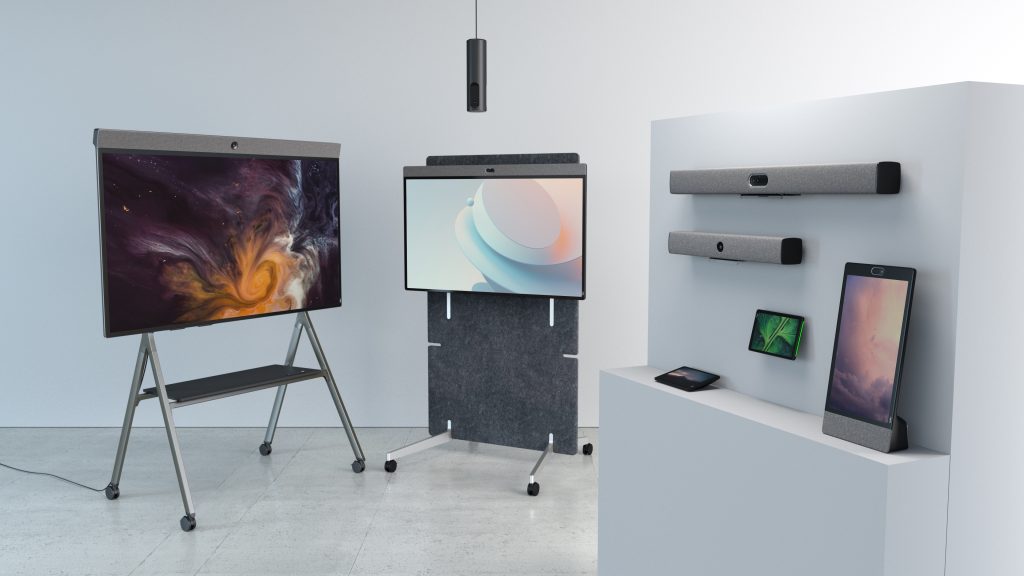
Neat helps organizations create better hybrid collaboration experiences through appliance-based conferencing systems designed for modern workplaces. Neat devices combine cameras, microphones, speakers, and compute into integrated collaboration systems for Zoom and Microsoft Teams environments, helping create more consistent and reliable meeting experiences across conference rooms and collaboration spaces.
Organizations commonly deploy Neat devices such as:
- Neat Bar Generation 2 for small and medium meeting rooms
- Neat Bar Pro for larger collaboration spaces
- Neat Board 50 for all-in-one video collaboration and whiteboarding
- Neat Center to improve visibility and inclusion for remote participants
These integrated solutions help reduce meeting friction, simplify room management, and support more inclusive hybrid meetings. As AI-powered collaboration continues to evolve, organizations are increasingly looking for meeting environments that balance simplicity, usability, scalability, and a consistent user experience.
Businesses that invest in seamless, easy-to-use collaboration spaces are often better positioned to support flexible work, strengthen team engagement, and scale effectively across distributed workplaces.
Perhaps it’s time to book a demo and experience them for yourself.
Frequently asked questions
What are the biggest advantages of video conferencing?
The biggest advantages include improved communication, lower travel costs, better hybrid collaboration, increased flexibility, and faster decision-making.
Is video conferencing still important in 2026?
Yes. Video conferencing is now core business infrastructure supporting hybrid work, global collaboration, AI-powered meetings, and distributed teams.
How does video conferencing improve productivity?
Video conferencing reduces communication delays, enables faster collaboration, supports real-time decision-making, and increasingly automates meeting documentation through AI features.
Why is video conferencing important for hybrid work?
Video conferencing helps create equitable collaboration experiences between remote and in-office employees while supporting flexible work arrangements.
What industries benefit most from video conferencing?
Almost every industry now relies on video conferencing, including healthcare, finance, education, technology, consulting, government, and professional services.
Sources
- Gallup — The Future of the Office Has Arrived: It’s Hybrid
https://www.gallup.com/workplace/511994/future-office-arrived-hybrid.aspx - Microsoft Work Trend Index
https://www.microsoft.com/en-us/worklab/work-trend-index - Zoom — The State of Hybrid Work
https://explore.zoom.us/en/hybrid-work/ - AVNetwork — Pro AV Trends for 2026
https://www.avnetwork.com/news/trends-2026-pro-av-hangs-tough - Gartner — Future of Work Trends
https://www.gartner.com/en/human-resources/topics/future-of-work





