

How to Make Working from Home (WFH) Successful
Hayley Spooner, May 27, 2026
What makes working from home successful?
Successful working from home depends on combining the right environment, consistent routines, and reliable technology. Most organisations now recognize that productivity and wellbeing improve when remote work is supported with purpose-built tools and clear structure.
Understanding what WFH really means
Working from home (WFH) is more than simply doing your job outside the office. It involves designing your home environment, habits, and technology setup to support productivity in a different context.
For many organisations, WFH is no longer temporary. It has become a long-term strategy that enables flexibility, improves work-life balance, and allows access to a broader talent pool.
However, success depends on how well this environment is set up. Without the right approach, remote work can lead to communication gaps, isolation, and reduced efficiency.
The benefits and challenges of WFH
Working from home offers clear advantages when supported properly. Many employees experience improved focus, reduced commuting time, and better work-life balance. Organisations also benefit from lower overhead costs and increased flexibility.
At the same time, there are challenges to address. Remote workers can feel disconnected from their teams, and maintaining communication requires more effort. Poor technology—especially low-quality video or audio—can significantly impact productivity and engagement.
WFH benefits vs challenges
| Aspect | Benefits of WFH | Challenges of WFH |
| Productivity | Fewer distractions for focused work | Requires strong self-discipline |
| Flexibility | Better work-life balance | Boundaries can blur |
| Collaboration | Digital tools enable remote work | Harder to maintain connection |
| Costs | Reduced commuting and office costs | Requires home setup investment |
| Communication | Can be efficient and documented | Risk of miscommunication |
Building an effective home workspace
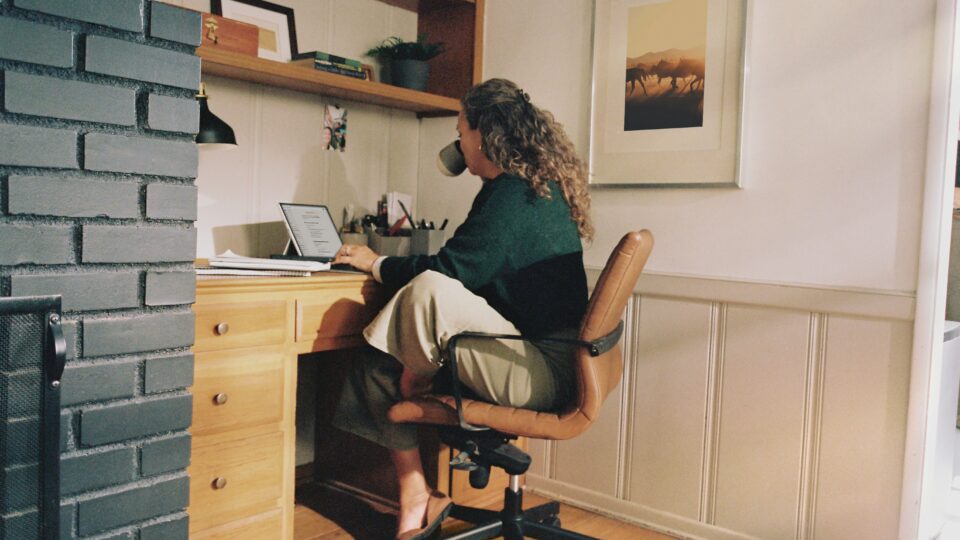
A successful WFH setup starts with the right environment. This includes both physical space and digital tools.
Creating a dedicated workspace helps establish a clear boundary between work and personal life. Even in smaller homes, a defined area can improve focus and reduce distractions. Establishing routines—such as consistent start and end times—also helps maintain productivity.
Technology is equally important. Reliable internet and a good device are essential, but the quality of your video setup often determines how effective communication will be.
Why video technology is critical for WFH
Remote work relies heavily on video communication. Unlike office environments, where conversations happen naturally, WFH depends on structured digital interactions.
This makes video quality a critical factor. Poor cameras and microphones can create friction in meetings, reduce clarity, and increase fatigue over time.
Purpose-built video devices solve this by delivering consistent, high-quality audio and video without relying on laptop hardware.
How Neat devices improve WFH
Neat devices are designed specifically to improve video collaboration by combining hardware, software, and intelligent automation into a single experience.
Neat Frame is built for individual workspaces. It includes a 50MP camera with a 113° field of view and automatic framing, which keeps users centered even when they move around. It also features a 15.6-inch touchscreen, built-in speakers, and a three-microphone array, allowing it to function as a complete standalone video device rather than relying on a laptop.
This allows users to maintain eye-level presence and natural movement during meetings, improving engagement and professionalism.
For more flexible home and hybrid setups, Neat Board 32 provides an all-in-one collaboration device that combines video conferencing, touch collaboration, intelligent audio, and adaptive video in a compact format. Its versatile design makes it well suited to home offices, small workspaces, and multi-purpose environments where users want a simple, high-quality collaboration experience without needing multiple devices.
For advanced home setups, Neat Bar extends these capabilities. It enables true BYOD workflows, allowing users to connect via USB-C and instantly use high-quality cameras, microphones, and speakers while running meetings from their own device.
It also includes features such as:
- Neat Audio, which adapts to room acoustics and reduces noise
- Neat Symmetry, which frames participants individually
- Neat Boundary, which limits capture areas to reduce distractions
These features automatically adjust based on the environment, meaning users don’t need to manage settings manually.
Together, these devices create a consistent, high-quality experience across both home and office environments.
Standard webcam setup vs Neat devices
| Feature | Standard laptop/webcam setup | Neat devices |
| Video quality | Limited camera resolution and angle | High-resolution cameras with wide field of view |
| Framing | Static and manual | Automatic framing and tracking |
| Audio | Basic microphones | Beamforming mic arrays with noise reduction |
| Setup | Multiple devices and adjustments | All-in-one, plug-and-play systems |
| Movement | User must stay still | Camera adapts as you move |
| Consistency | Varies by user setup | Consistent experience across environments |
Creating better routines and habits
Technology alone is not enough to make WFH successful. Daily habits and routines play a critical role.
Setting clear working hours helps maintain boundaries between work and personal life. Creating a structured schedule ensures that tasks are prioritized and completed efficiently. Regular breaks are also important to maintain focus and avoid fatigue.
Communication habits are equally important. Remote workers need to be proactive in sharing updates, participating in meetings, and staying visible within their teams.
Supporting remote culture and collaboration
One of the biggest challenges of WFH is maintaining a sense of connection and culture. Without in-person interaction, teams need to be more intentional about communication and engagement.
Video plays a key role here. High-quality video makes interactions feel more human and helps recreate face-to-face communication.
Neat devices support this by enabling more natural, inclusive meetings. Features such as individual framing and adaptive audio ensure that everyone is clearly seen and heard, helping maintain engagement and participation.
Managing WFH at scale
As organisations grow, managing remote work setups becomes more complex. Ensuring consistency across multiple users and environments can be challenging without centralised control.
Neat Pulse addresses this by providing a cloud-based management platform that allows IT teams to monitor, configure, and update devices remotely. It offers features such as:
- Centralised device management and configuration
- Real-time monitoring of device status and usage
- Remote control and bulk updates
- Secure access with audit logs and Single Sign-On (SSO) support
This reduces IT overhead while ensuring a consistent experience across teams.
Where Neat fits in
Neat helps make working from home more effective by creating video collaboration experiences that feel natural, consistent, and easy to manage.
Devices such as Neat Frame are purpose-built for individual workspaces, combining high-resolution video, intelligent framing, adaptive audio, and an integrated touchscreen into a single device designed specifically for remote work. For more flexible home or hybrid setups, Neat Bar supports simple BYOD workflows while delivering advanced features such as Neat Symmetry, Neat Audio, and Neat Boundary to improve clarity and reduce distractions. Meanwhile, Neat Board 32 offers an all-in-one collaboration device that works equally well in home offices, small meeting spaces, and flexible work environments, combining touch collaboration, video conferencing, and intelligent audio and video into a compact format.
Together, these solutions help organizations create more seamless and professional collaboration experiences across both home and office environments — supporting the broader shift toward sustainable, long-term hybrid work.
Key takeaway
Making working from home successful requires more than just flexibility. It involves creating the right environment, building effective routines, and using technology that supports clear and consistent communication.
By using purpose-built solutions such as Neat Frame for personal workspaces, Neat Bar for flexible BYOD setups, Neat Center for full-room coverage, and Neat Pulse for centralised management, organisations can deliver a consistent and high-quality experience wherever people work.
When these elements come together, WFH becomes not just viable, but highly productive and sustainable.
Frequently asked questions about WFH
What is WFH?
WFH stands for “working from home” and refers to performing job responsibilities remotely using digital tools instead of working in a traditional office environment.
What do you need to work from home successfully?
You need a dedicated workspace, reliable internet, a suitable device, and high-quality video conferencing tools. Good routines and communication habits are also essential.
Why is video important for WFH?
Video is the primary way remote teams communicate and collaborate. High-quality video improves engagement, reduces misunderstandings, and helps maintain team connection.
Are laptops enough for WFH meetings?
Laptops can work, but built-in cameras and microphones often provide inconsistent quality. Purpose-built devices can significantly improve the experience.
How do Neat devices help with WFH?
Neat devices provide high-quality video, advanced audio, and intelligent features such as automatic framing and noise reduction, creating a more natural and professional meeting experience.
What is the biggest challenge of WFH?
One of the biggest challenges is maintaining communication and connection with colleagues. Without the right tools and habits, remote workers can feel isolated or disconnected.
Book a demo or explore our range of devices today.