

Essential Video Conferencing Gear Checklist for Remote Home Offices in 2026
Hayley Spooner, Jun 8, 2026

Key takeaways
- A professional home-office video conferencing setup has become a business necessity rather than an optional upgrade.
- Audio quality remains the single most important factor influencing meeting effectiveness, engagement, and communication clarity.
- AI-powered collaboration technology is transforming how people experience video meetings, both at home and in the office.
- Successful video conferencing environments combine technology, workspace design, connectivity, lighting, and ergonomics.
- Organizations increasingly benefit from standardizing collaboration experiences across remote and office-based employees.
- Integrated collaboration devices can reduce complexity while delivering a more consistent and reliable meeting experience.
The modern home office is now a business-critical environment
The home office has undergone a remarkable transformation over the past several years. What began as a temporary response to changing work patterns has evolved into a permanent component of how organizations operate. In 2026, hybrid work is no longer a trend. It is simply the reality of modern business.
Employees now move fluidly between home offices, corporate headquarters, coworking spaces, and customer sites. While the location may change, expectations remain consistent. Team members are expected to collaborate effectively, communicate clearly, and contribute meaningfully regardless of where they happen to be working.
This shift has elevated the importance of home-office technology. A poor video conferencing experience is no longer a minor inconvenience. It can disrupt decision-making, reduce productivity, create communication barriers, and negatively affect employee experience. Conversely, a well-designed setup helps remote employees participate with confidence and professionalism while ensuring they remain fully connected to their colleagues and customers.
Organizations increasingly recognize that a home-office collaboration environment should be treated as an extension of the workplace itself. The goal is not simply to enable video calls. It is to create an environment where people can do their best work.
What equipment is actually essential for video conferencing in 2026?
Many professionals assume building an effective video conferencing setup requires a long list of expensive equipment. In reality, the most successful home-office environments focus on a handful of critical components working together seamlessly.
A professional setup depends on five foundational elements:
| Component | Why It Matters | Priority Level |
|---|---|---|
| Audio | Determines communication quality and meeting effectiveness | Critical |
| Video | Supports engagement, presence, and collaboration | Critical |
| Connectivity | Ensures reliability and consistency | Critical |
| Lighting | Improves appearance and camera performance | High |
| Workspace Design | Supports comfort and productivity | High |
While each element contributes to the overall experience, they should not be viewed in isolation. The strongest video conferencing environments combine all five to create a seamless collaboration experience that feels natural rather than technical.
One of the most common mistakes professionals make is focusing heavily on camera specifications while overlooking audio, lighting, or workspace design. In practice, these factors often have a greater impact on meeting quality than video resolution alone.
Why audio quality matters more than video quality
When people think about video conferencing, they naturally focus on what they can see. However, the most important element of any meeting is what participants can hear.
Human beings are surprisingly tolerant of imperfect video. Participants can usually overlook occasional visual artifacts, less-than-perfect lighting, or lower-resolution images without significantly affecting communication. Audio is different. When speech becomes difficult to understand, conversations quickly become frustrating.
Poor audio forces participants to work harder to follow discussions. Over time, this creates cognitive fatigue, reduces engagement, and increases the likelihood of misunderstandings. In meetings where important decisions are being made, these issues can have a direct impact on business outcomes.
This challenge becomes even more significant in home environments. Employees may contend with household noise, traffic, deliveries, pets, construction, or other distractions that rarely exist within traditional office spaces.
Fortunately, advances in collaboration technology have dramatically improved audio performance. Modern devices increasingly rely on AI-powered noise suppression, beamforming microphone arrays, and intelligent voice enhancement technologies that prioritize human speech while reducing background distractions.
The result is a more natural conversation that allows participants to focus on ideas rather than technology.
For organizations investing in remote-work equipment, audio quality should remain the first priority.
The camera has evolved beyond simple video
The role of the camera has changed significantly over the past decade.
Historically, webcams existed simply to capture and transmit video. Today’s collaboration devices are far more sophisticated. Artificial intelligence now plays an increasingly important role in shaping how participants appear during meetings.
Modern cameras can automatically adjust framing, optimize exposure, compensate for difficult lighting conditions, and maintain a professional appearance without requiring constant user intervention. These capabilities are particularly valuable in home offices where lighting and environmental conditions can vary dramatically throughout the day.
AI-powered framing technology has become especially important. Rather than forcing users to remain perfectly positioned throughout a meeting, intelligent systems can dynamically adjust the image to keep participants naturally centered in the frame.
This seemingly simple capability contributes significantly to meeting quality. Participants appear more engaged, presentations feel more dynamic, and conversations become more natural.
The best video conferencing technology in 2026 is often the technology people notice the least. Rather than drawing attention to itself, it quietly removes friction and allows participants to focus entirely on the discussion.
Connectivity is the foundation of every meeting
Even the most advanced collaboration equipment cannot compensate for an unreliable internet connection.
As video conferencing platforms continue to introduce AI-powered capabilities such as live transcription, intelligent summaries, real-time translation, and enhanced video processing, network performance becomes increasingly important.
Reliable connectivity influences nearly every aspect of the meeting experience, including audio quality, video stability, screen sharing performance, and overall responsiveness.
For most professionals, fiber-based internet services provide the best experience. Where fiber is unavailable, high-quality broadband connections can still support modern collaboration requirements. Organizations should also encourage employees to maintain robust home Wi-Fi infrastructure and consider wired ethernet connections for mission-critical meetings.
The difference between a stable connection and an inconsistent one is often the difference between a productive meeting and a frustrating experience.
Recommended connectivity standards for 2026
| Meeting Type | Recommended Speed |
|---|---|
| Standard HD Meetings | 5 Mbps |
| Full HD Meetings | 10 Mbps |
| Multi-Participant Meetings | 15 Mbps |
| AI-Enhanced Collaboration | 20 Mbps+ |
While speed remains important, consistency is often even more valuable. A stable connection with slightly lower bandwidth will typically outperform a faster connection that suffers from frequent interruptions.
Why lighting remains one of the most overlooked investments
Lighting continues to be one of the simplest and most effective ways to improve video conferencing quality.
Many professionals assume image quality depends primarily on the camera. In reality, lighting often has a greater impact on appearance than the camera itself.
Even premium devices struggle when participants are poorly lit. Harsh shadows, backlighting, and inconsistent brightness can make people appear distracted, disengaged, or difficult to see clearly.
Home-office environments present unique challenges because they are rarely designed specifically for video communication. Natural light changes throughout the day, overhead lighting creates shadows, and room layouts often prioritize other activities.
A simple front-facing light source can dramatically improve appearance while helping modern cameras perform more effectively. Consistent illumination creates a more professional image, supports AI-powered optimization features, and helps participants maintain a stronger visual presence during meetings.
For organizations seeking a high-impact, low-cost improvement, lighting remains one of the smartest investments available.
Workspace design matters more than most organizations realize
Technology is only one part of the equation.
A successful home-office environment must also support comfort, focus, and productivity throughout the workday.
Many employees now spend multiple hours each day participating in video meetings. Poor ergonomics can contribute to fatigue, discomfort, and reduced concentration. Over time, these issues affect both wellbeing and performance.
A well-designed workspace should include an ergonomic chair, appropriately positioned displays, sufficient desk space, and an environment that minimizes distractions. Acoustic considerations are equally important. Hard surfaces can create echoes that negatively affect audio quality, while soft furnishings, rugs, curtains, and bookshelves often improve the overall sound environment.
Organizations that treat workspace design as part of their collaboration strategy typically see stronger employee satisfaction and better meeting experiences.
The rise of integrated collaboration devices
As collaboration technology becomes more sophisticated, many organizations are moving away from fragmented setups that rely on multiple disconnected components.
Managing separate cameras, microphones, speakers, software updates, and support requirements can create unnecessary complexity for both users and IT teams.
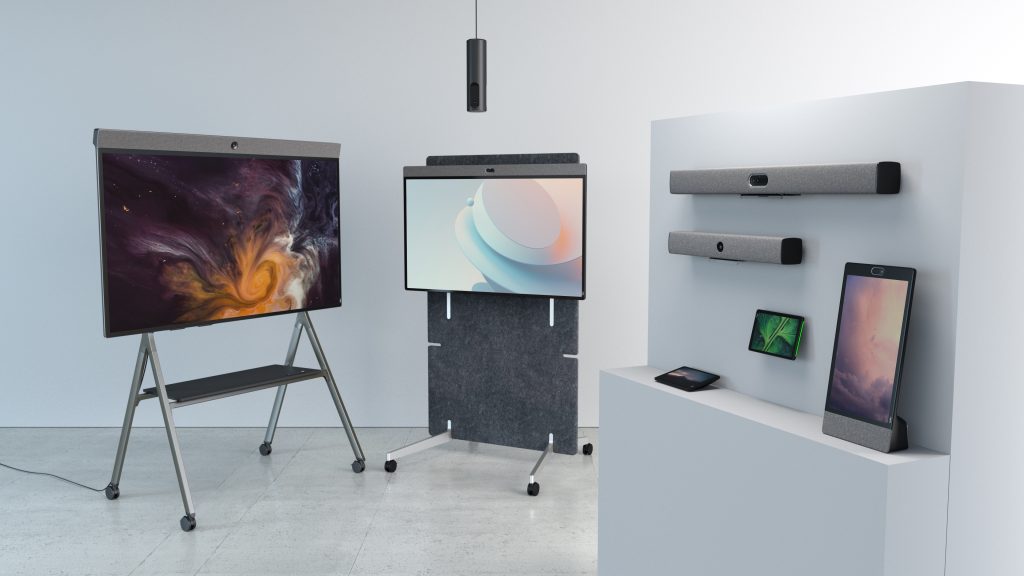
Integrated collaboration devices, like those made by Neat, address this challenge by bringing multiple capabilities together within a single solution. Rather than requiring users to assemble and manage individual components, these systems provide a streamlined experience that is easier to deploy, support, and use.
This trend reflects a broader shift within workplace technology. Organizations increasingly prioritize simplicity, reliability, and consistency over raw specifications.
The most effective technology is often the technology that requires the least effort from employees.
Future-proofing your home-office investment
Technology continues to evolve rapidly, making future-proofing an important consideration when selecting video conferencing equipment.
Rather than focusing exclusively on today’s requirements, organizations should evaluate how solutions will support future workplace needs.
Several factors are becoming increasingly important:
- AI-powered collaboration capabilities
- Cross-platform interoperability
- Cloud-based device management
- Enhanced security controls
- Sustainability and lifecycle considerations
- Scalability across different work environments
Organizations that invest strategically can avoid frequent technology replacements while maintaining high-quality collaboration experiences as workplace expectations continue to evolve.
Where Neat fits in
As organizations continue to refine their hybrid-work strategies, many are looking for ways to simplify collaboration while maintaining a consistently high-quality experience across home offices, meeting rooms, and shared workspaces.
Neat’s portfolio of collaboration devices is designed around this principle. Rather than requiring separate cameras, microphones, speakers, and management tools, Neat combines these capabilities into purpose-built devices that are optimized for modern video-first work.
Solutions such as Neat Frame are particularly well suited to professional home-office environments, offering intelligent framing, premium audio performance, and a dedicated collaboration experience in a single device. Across the broader portfolio, Neat incorporates advanced AI capabilities designed to improve meeting equity, participant engagement, and overall collaboration quality.
For IT teams, Neat Pulse provides centralized management and visibility, helping organizations support distributed workforces while maintaining consistency across environments.
As hybrid work continues to evolve, integrated collaboration experiences are becoming increasingly important. Neat’s approach aligns closely with this shift by reducing complexity while helping employees connect more naturally wherever they work.
Book a demo or explore our range of devices today.
Frequently asked questions
What is the most important piece of video conferencing equipment?
For most professionals, audio equipment has the greatest impact on meeting quality. Clear communication remains the foundation of successful collaboration.
Do I need a dedicated webcam in 2026?
While laptop cameras continue to improve, dedicated collaboration devices and advanced cameras typically provide superior image quality, framing, and AI-powered enhancements.
How important is internet speed for video conferencing?
Reliable connectivity is essential. Most professionals should aim for at least 10 Mbps to support high-definition meetings and modern collaboration features.
Are all-in-one collaboration devices worth the investment?
For many organizations, integrated solutions simplify deployment, improve consistency, and reduce support requirements while delivering a higher-quality meeting experience.
How can I improve my video conferencing setup without replacing everything?
Lighting improvements, audio upgrades, and workspace optimization often provide significant benefits without requiring a complete technology refresh.
Sources
Microsoft Teams Background Noise Suppression, Microsoft
https://learn.microsoft.com/en-us/microsoftteams/background-noise-suppression
Microsoft Teams Rooms Documentation, Microsoft
https://learn.microsoft.com/en-us/microsoftteams/rooms/
Zoom System Requirements and Bandwidth Recommendations, Zoom
https://support.zoom.com/hc/en/article?id=zm_kb&sysparm_article=KB0060748
Zoom Workplace Resources, Zoom
https://www.zoom.com/en/products/collaboration-tools/workplace/
Zoom Learning Center, Zoom
https://learning.zoom.us/
Gartner Hybrid Work Research Hub, Gartner
https://www.gartner.com/en/human-resources/topics/hybrid-work
Future of Work Research, IDC
https://www.idc.com/promo/future-of-work
Digital Workplace Research, Frost & Sullivan
https://www.frost.com/frost-perspectives/digital-transformation/