


Best Scheduling Displays for Any Platform and BYOD Meeting Room Controllers
Hayley Spooner, May 28, 2026
What this page covers
This page explains how modern meeting room scheduling displays and controllers work in mixed-platform environments, and what to look for when standardizing across offices. It is written for IT and facilities teams managing Zoom, Microsoft Teams, Google Meet, and BYOD workflows.
- What makes a scheduling display effective across multiple platforms.
- Why dual-purpose devices (display + controller) simplify room design.
- How Neat Pad and Neat Pad Pro support hybrid, mixed-platform offices.
- Key features to prioritize, including PoE, LED visibility, and mounting flexibility.
- How to deploy a consistent room experience across buildings and platforms.
- Answers to common questions about cross-platform room panels and controllers.
- Why remote device management is essential for scalable deployments.
What is a scheduling display and meeting room controller?
A scheduling display is a dedicated touchscreen placed outside a meeting room that shows availability and allows users to book the space. A meeting room controller is a touchscreen inside the room that lets users start meetings, manage participants, and control audio, video, and screen sharing.
In modern offices, these two functions are often combined into a single device. This allows organizations to standardize room technology across platforms such as Zoom, Microsoft Teams, and Google Meet, while also supporting BYOD workflows.
Universal scheduling displays for mixed platforms
Modern offices rarely operate on a single collaboration platform. Even when an organization standardizes on one system, there are always exceptions. External meetings may run on Zoom, internal meetings may default to Microsoft Teams, and certain teams may rely on Google Meet. At the same time, many spaces are still used in BYOD mode, where users bring their own laptops and join meetings in a browser.
This creates a practical challenge. People need to know whether a room is available, how to book it, and how to start a meeting, regardless of the platform involved. Without a consistent approach, rooms become unpredictable and users lose confidence in the setup.
A universal scheduling display solves this by presenting clear room availability and supporting booking workflows across different systems. A universal controller complements this by providing a consistent in-room experience, so users can start and manage meetings without needing to think about the underlying platform.
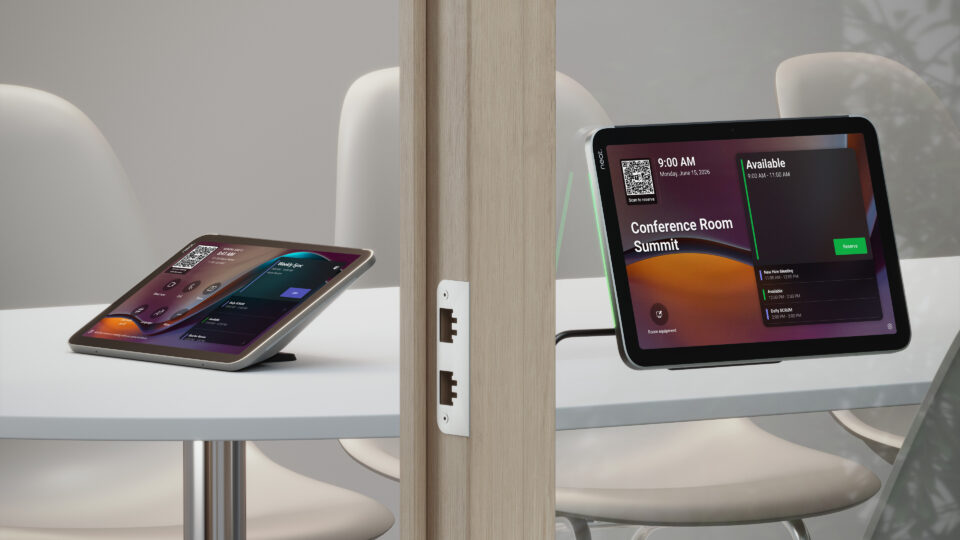
Neat Pad is designed to meet this need. It is a dedicated touchscreen that can be installed outside the room as a scheduling display or inside the room as a controller. It supports major room platforms and integrates with common scheduling workflows, allowing organizations to standardize the physical experience even when their software stack is mixed.
Neat Pad Pro builds on the same concept with a larger 10.1-inch display, two microphones that can be activated together or individually, and a more powerful platform designed for long-term flexibility. It is suited to organizations that want a more prominent interface and additional headroom for future features while maintaining the same simplicity of deployment.
At scale, consistency is not just about the user experience—it is also about manageability. IT teams need to be able to monitor, update, and troubleshoot devices remotely across multiple locations. This is where centralized platforms like Neat Pulse become essential, enabling full control without requiring on-site intervention.
Must-haves for cross-platform room panels
When evaluating scheduling displays and controllers for mixed environments, it is important to focus on operational consistency rather than just screen size or price. The right device should make rooms easier to use, easier to deploy, and easier to manage over time.
The following requirements are especially important in multi-platform offices:
| Feature | Why it matters in mixed environments | Neat Pad and Neat Pad Pro |
| Multi-platform compatibility | Rooms may run different systems across buildings or departments | Supports major room booking platforms and flexible booking workflows |
| Dual-purpose design | Reduces the need for separate devices inside and outside the room | Can be used as a scheduling display and room controller |
| One-cable deployment | Simplifies installation and reduces points of failure | Power over Ethernet provides power and data through a single cable |
| Clear room-status visibility | Users need instant feedback on room availability | LED indicators make status visible from a distance |
| Flexible mounting | Offices include glass, walls, and shared tables | Supports multiple mounting options for different environments |
| Centralized management | Large estates require remote visibility and control | Can be managed through Neat Pulse |
| Remote manageability | Large estates require centralized visibility, control, and the ability to troubleshoot without being on-site | Managed through Neat Pulse for remote monitoring, configuration, updates, and control across all devices |
These features work together to create a consistent experience. Just as importantly, centralized remote management ensures that devices remain reliable and easy to support over time, even across large or distributed estates.
Neat Pad and Neat Pad Pro: Platform-aware simplicity for hybrid offices
Scheduling display for everyday mixed estates
A scheduling display should remove uncertainty. When someone approaches a meeting room, they should immediately understand whether it is free and whether they can book it. The interface should be clear, responsive, and consistent across every room in the building.
Neat Pad is designed with that goal in mind. When installed outside a room, it shows availability and supports booking workflows aligned with the room’s configured platform. It can be used with Zoom Rooms, Microsoft Teams Rooms, and Google Meet environments, while also supporting a wide range of scheduling platforms through Neat Open.
Neat Open enables native support for multiple room booking and workplace applications, rather than limiting organizations to a single scheduling provider. This allows customers to choose the platform that fits their workflows and deploy it directly on the device, while maintaining a consistent experience across rooms. Specific supported applications are available through Neat Open Apps, the application ecosystem within Neat Open, helping ensure compatibility with existing tools and future flexibility.
The device itself is purpose-built rather than repurposed from consumer hardware. It has a dedicated touchscreen, integrated sensors, and LED indicators that communicate room status clearly. The design is slim and unobtrusive, which helps it fit into modern office environments without drawing unnecessary attention.
Neat Pad Pro extends this experience with a larger and higher-resolution 10.1-inch display, along with enhanced visibility and a more premium feel. This makes it particularly well suited to larger rooms, executive spaces, or organizations that want a more prominent scheduling interface.
Universal meeting controller inside the room
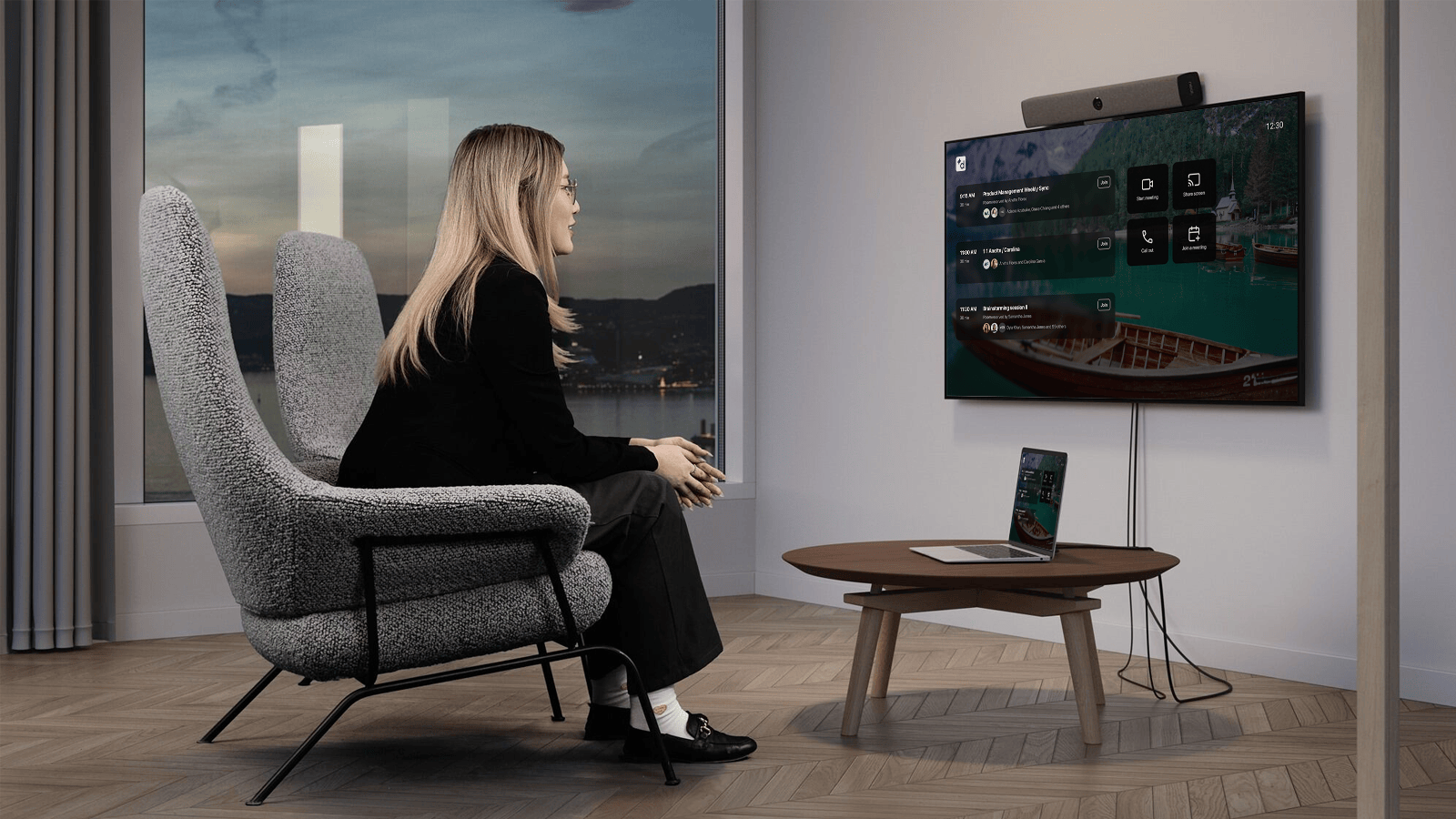
Inside the meeting room, the focus shifts from visibility to usability. People want to start meetings quickly, control audio and video easily, and share content without friction. The controller should feel reliable and intuitive, regardless of the platform being used.
Neat Pad supports this by acting as a dedicated controller for major room platforms, including Zoom Rooms, Microsoft Teams Rooms, and Google Meet Spaces. Users can start meetings with a single tap, invite participants, share content, and manage calls through a consistent interface.
It also supports the use of multiple controllers within a single room, which is useful for larger spaces where participants may be seated far from the main display.
Neat Pad Pro offers the same core functionality with additional capability. Its built-in audio processing enable a broader range of use cases and future enhancements. This makes it a strong option for organizations planning longer-term investments in meeting room technology.
Deployment across platform mixes
Zoom-dominant offices
In Zoom-focused environments, consistency and speed are key. Users expect to walk into a room, see availability clearly, and start meetings without delay. A dedicated scheduling display and controller help reinforce that expectation.
Neat Pad can be configured for Zoom Rooms scheduling and control, replacing general-purpose tablets with a purpose-built device. This improves reliability and creates a more polished experience.
Neat Pad Pro is well suited to premium Zoom spaces where a larger display and more visible status indicators are beneficial.
Zoom also facilitates deployment of multiple room controllers in the same space.
Microsoft Teams environments
In Microsoft Teams environments, the goal is often to standardize across a large number of rooms. A consistent scheduling display and controller help reduce training requirements and improve adoption.
Neat Pad supports Microsoft Teams Rooms and can be used both as a panel outside the room and as a controller inside it. This allows organizations to maintain a consistent physical experience even as they scale.
Neat Pad Pro provides an upgraded option for spaces where a larger interface and additional performance are desired, while still aligning with the same deployment model.
Google Meet environments
In Google Meet environments, simplicity and browser-based workflows are often a priority. Many organizations rely on Google Calendar for scheduling and use a mix of dedicated meeting spaces and flexible BYOD rooms.
Neat Pad supports Google Meet Spaces as a meeting room controller, providing a consistent interface for joining and managing meetings. For scheduling, Neat devices can integrate with Google Workspace workflows through applications available via Neat Open Apps, the apps ecosystem available within Neat Open.
Through Neat Open, IT Administrators can choose from a broad portfolio of third-party scheduling apps, enabling flexibility to align room booking experiences with existing workplace tools and workflows.
Neat Pad Pro provides an enhanced option for spaces where a larger display and additional performance are desired, while maintaining the same deployment model.
BYOD and mixed-platform offices
In mixed-platform environments, flexibility becomes the most important factor. Rooms need to support different meeting types without requiring different hardware for each one.
Neat Pad addresses this by supporting multiple room platforms and flexible scheduling configurations. It allows organizations to standardize the device while accommodating different workflows.
Neat Pad Pro builds on this with a more advanced platform that is designed to support future integrations and evolving use cases. This makes it particularly attractive for organizations that expect their collaboration tools to change over time.
This flexibility extends to scheduling. Through Neat Open Apps, the application ecosystem within Neat Open, organizations can support multiple booking platforms natively, allowing them to standardize the device while accommodating different workplace systems across teams or regions.
Multi-system campuses
Large campuses often include a mix of legacy and modern systems. Standardizing on a single device family helps simplify management and reduce complexity.
Both Neat Pad and Neat Pad Pro support Power over Ethernet for clean deployment and can be managed centrally through Neat Pulse, enabling remote monitoring, updates, configuration, and troubleshooting across all rooms. This makes it easier to roll out consistent room experiences across multiple buildings, even when the underlying platforms differ.
Neat Pad or Neat Pad Pro: Which should you choose?
Neat Pad is designed for straightforward scheduling and control across standard meeting rooms. It offers a clean interface, reliable performance, and simple deployment.
Neat Pad Pro builds on this with a larger 10.1-inch display, stronger processing, and additional hardware features such as built-in audio processing. It is better suited to larger rooms, premium spaces, or organizations planning for long-term flexibility.
Cross-platform rollout checklist
A successful rollout depends on planning and consistency. The following steps provide a practical framework:
- Identify which platforms are used in each room and building.
- Decide where a standard device is sufficient and where a larger or more advanced model is appropriate.
- Standardize mounting approaches across walls, glass, and tables.
- Ensure PoE infrastructure is in place.
- Align calendar and booking workflows before deployment.
- Test real-world usage scenarios, including guest meetings and BYOD workflows.
- Add additional controllers in larger rooms where needed.
- Use centralized management tools to monitor and maintain the deployment.
Why standardizing room technology matters
Standardizing on a single device across meeting rooms reduces training time, simplifies support, and improves user confidence. It also allows IT teams to manage devices centrally and roll out updates consistently.
Devices like Neat Pad and Neat Pad Pro support this approach by offering the same user experience across different room types and collaboration platforms.
Combined with centralized management through Neat Pulse and flexible app support via Neat Open, this approach gives organizations both control and adaptability as their workplace technology evolves.
FAQ’s
Is a scheduling display the same thing as a room panel, meeting room tablet, or room booking display?
Yes—these terms usually refer to the same type of device: a touchscreen used to show and manage meeting room availability. A scheduling display, room panel, meeting room tablet, and room booking display are generally interchangeable, with slight differences in emphasis (for example, “room panel” highlights wall placement, while “booking display” focuses on calendar use). The only related term that is slightly different is a meeting room controller, which is typically used inside the room to start and manage meetings, although modern devices like Neat Pad and Neat Pad Pro can be deployed for both roles.
What is the best scheduling display for mixed Zoom and Microsoft Teams offices?
The best option is a dedicated, purpose-built device that supports both platforms and provides a consistent user experience. Neat Pad is designed for this type of environment.
Can Neat Pad work in Google Meet spaces?
Yes. It can be used as a controller for Google Meet Spaces and can support scheduling workflows through third-party integrations.
What is a meeting room controller?
A meeting room controller is a touchscreen device used to start, manage, and control meetings within a room. It allows users to join calls, manage participants, and share content.
Can one device handle both scheduling and control?
Yes. Both Neat Pad and Neat Pad Pro are designed to function as scheduling displays or meeting room controllers.
Why is POE important?
Power over Ethernet simplifies installation by delivering power and data through a single cable. This reduces clutter and improves reliability.
Is Neat Pad Pro better for larger rooms?
In many cases, yes. Its larger display and enhanced capabilities make it well suited to more prominent or high-usage spaces.
Can Neat Pad replace standard tablets?
Yes. It is designed as a purpose-built alternative to general-purpose tablets, offering better reliability and a more consistent experience.
Can multiple controllers be used in one room?
Yes. This is useful in larger rooms where participants need access to controls from different positions.
How do users see room availability quickly?
LED indicators provide clear visual signals that show whether a room is available or occupied.
Is this suitable for large deployments?
Yes. Both devices are designed for scalability and can be managed centrally.
How do you choose between Neat Pad and Neat Pad Pro?
Choose Neat Pad for simplicity and standard rooms. Choose Neat Pad Pro when you want a larger display, more advanced capabilities, and additional flexibility for future needs.
Discover Neat’s pioneering devices or book a demo and experience them for yourself.





